

How It Works
1
Roark walks the call's segments in order
A segment is one line of the transcript. Overlapping speech and system actions, such as a keypress or a hang-up, are segments too.
2
Each segment is checked against the triggers
A trigger compares a source metric’s value on that segment with a threshold, for example Frustration Score >= 4 for the customer. With several triggers, AND needs all of them to hold on the same segment, OR needs any one.
3
The window after a trigger is searched for the outcome
When the triggers hold, Roark looks at the segments inside the window, for example the next 3 segments, for one where the outcome holds. The trigger’s own segment isn’t part of the window.
4
The call gets one value
Did it happen? is true if any trigger found its outcome. How many times? counts the trigger segments that did. The segments that matched are marked on the call’s timeline as the metric’s evidence.
Creating a Pattern
In Studio
Open Studio in Author mode and pick the Pattern engine. The engine is locked after the first save.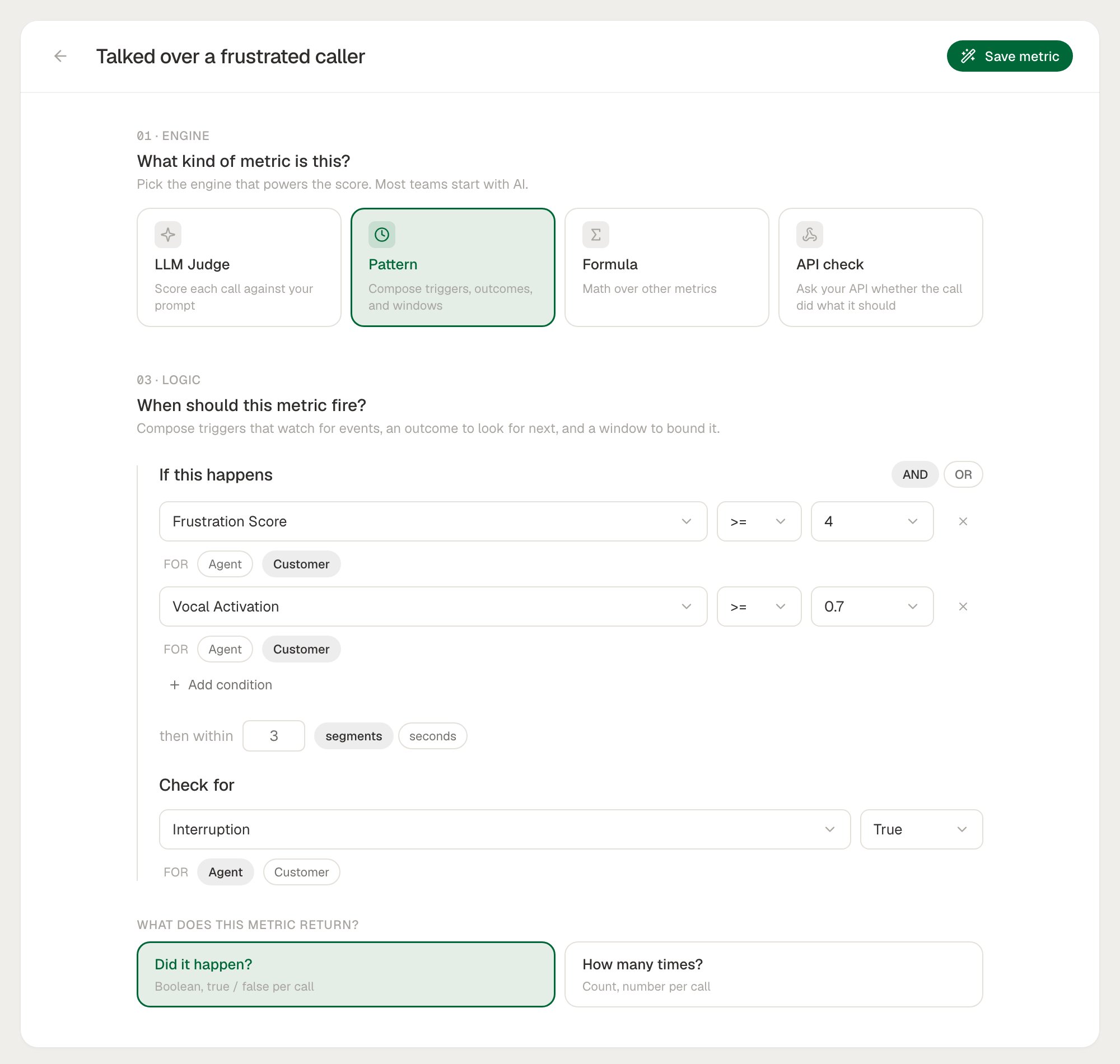
1
If this happens
Pick a trigger metric, an operator, and a value. For a per-participant metric, choose whose value counts: Agent or Customer. Click Add condition for more triggers, and choose AND or OR between them.
2
Then within
Set the window, in segments (1 to 20, default 3) or seconds (1 to 300, default 30).
3
Check for
Pick the outcome metric and the value it should reach. Each trigger and the outcome must use a different source metric.
4
What does this metric return?
Did it happen? gives a Boolean per call. How many times? gives a Count per call.
With the SDK or API
Create the metric withcalculationType: "PATTERN". Sources are referenced by metric definition id, so look them up first:
pattern.
Each trigger and the outcome take:
A request that references the same source metric twice, across the triggers and the outcome, is refused with
400. PUT /v1/metric/definitions/{idOrSlug} changes a pattern’s name. To change its logic, edit it in Studio, which saves a new version.
Patterns aren’t part of config as code yet. Create them in Studio or through the API.
Choosing Source Metrics
A pattern reads the values a metric records on segments or turns. Metrics that only record one value per call never match a trigger or an outcome. Good sources from the system metrics:
Your own LLM Judge metrics work too, when they record values per segment or turn.
Conditions compare numbers. Numeric, Count and Scale values are compared as they are, and a Boolean is
true (1) or false (0). Classification and Text metrics can’t be used as a source: their values never match.
Windows
The trigger’s own segment is never part of its window, so a pattern always relates two different lines.
Averaging the outcome
OUTCOME_AGGREGATE (API only) ignores the outcome’s operator and threshold. It averages the outcome metric’s values across every trigger’s window and records the result as a Numeric. Use it for questions like “how fast did the agent respond after a frustrated line”: trigger on Frustration Score >= 4, aggregate Response Time.
When Data Is Missing
- If no trigger metric recorded any values on the call, or the outcome metric recorded none, the pattern records N/A with the reason, rather than false.
- A call with no transcript segments gets no value.
- Make sure the source metrics run on the same calls: add them to the same collector or run plan as the pattern.
What’s Next
System Metrics
Find per-segment metrics to build patterns from
Formulas
Combine call-level metrics into one score
Studio
Build a pattern and test it on real calls
Collectors
Run the pattern automatically on live calls