

Quickstart
Define the metric in code (recommended), or build it in Studio.PER_PARTICIPANT fields.
Create it with the SDK
Create the metric withcalculationType: "LLM_JUDGE". It’s the default, so requests that leave calculationType out create an LLM Judge too.
Type-specific fields:
To change the prompt or labels later,
PUT /v1/metric/definitions/{idOrSlug} with the fields to change. Each change creates a new metric version.
Build it in Studio
Open Studio in Author mode and pick the LLM Judge engine. Choose an output type, then write the instructions: for a Boolean, the yes/no question the judge should answer; for a Scale, what each band means. Use the test rail to score real calls before you save.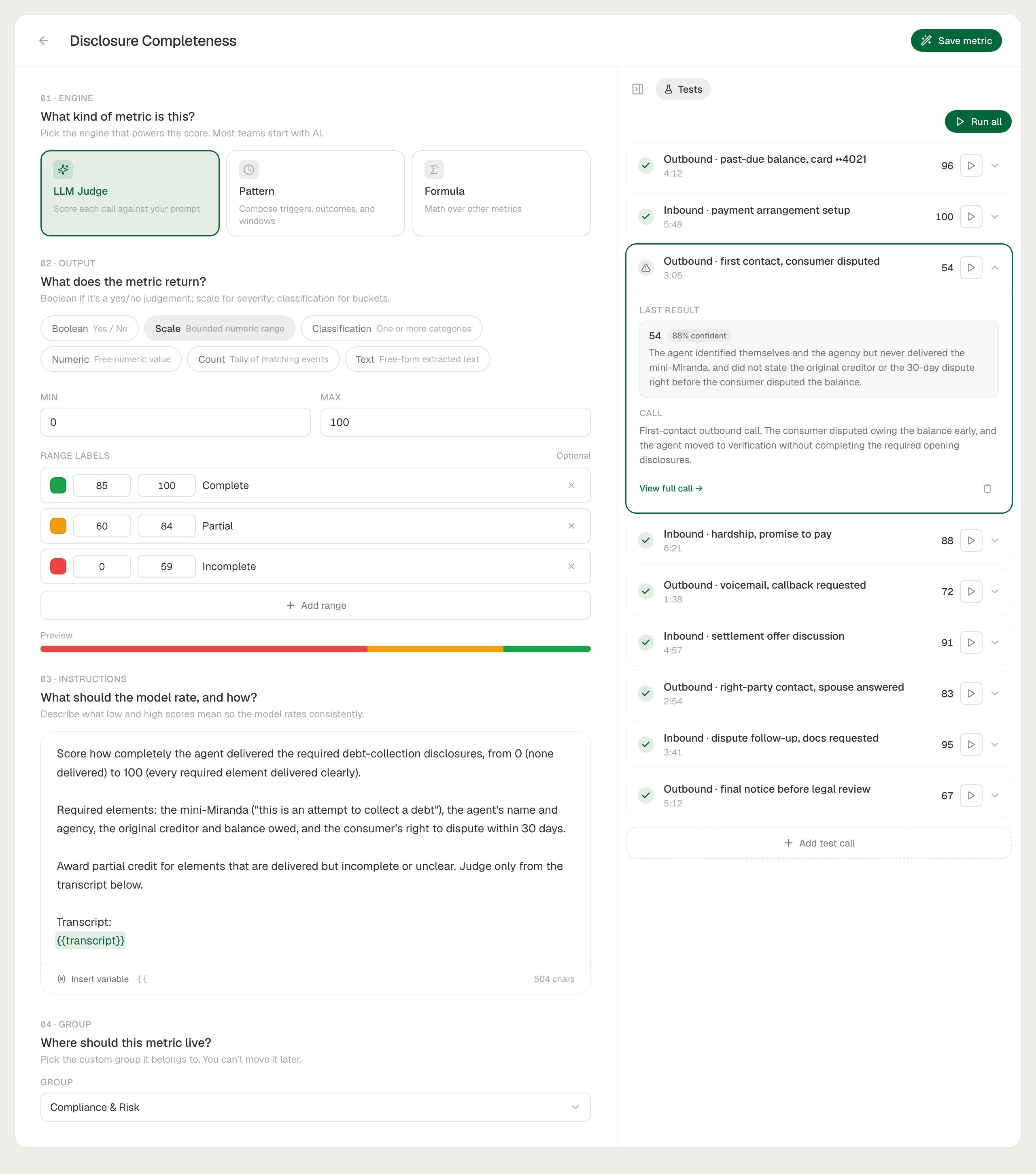
Output Types
Prompt Variables
Prompts reference call data with{{variable}} placeholders, which Roark fills in before the judge runs. In Studio, type {{ in the instructions to pick one.
Using a custom property
{{properties.<name>}} inserts just that property’s value, which makes it easy to grade the conversation against data from your own systems:
- The name can be written as stored (
partner_outcome) or as you send it (partnerOutcome). - If the call doesn’t carry the property, the prompt says so (
[partner_outcome property not set on this conversation]) rather than leaving the placeholder in. - Properties added after the call was created are picked up the next time the metric runs. See updating properties after ingest.
Writing Good Prompts
Ask one thing
Ask one thing
A prompt that checks identity, tone, and resolution at once gives you one number you can’t act on. Write three focused metrics and combine them with a formula if you need a single pass/fail.
Say what counts
Say what counts
Spell out the edge cases: “Verification counts if the agent confirmed two of name, date of birth, and postcode. Asking without confirming doesn’t count.”
Define every band of a scale
Define every band of a scale
For a Scale, describe what a 1, a 3, and a 5 look like. Without that, scores drift between calls that are about the same.
Test on real calls first
Test on real calls first
Run the metric against representative calls in Studio and read the reasoning before attaching it to a collector.
What’s Next
Studio
Write and test a prompt against real calls
Formulas
Combine focused judges into one score
Thresholds
Turn a score into a pass/fail check
Collectors
Run the metric automatically on live calls