

{ "passed": true | false, "reason": "..." }. It runs on live calls and simulations alike.
Every other metric reads the conversation. An API check reads your system of record instead. An agent that says “your PIN has been changed” while the tool call behind it failed passes every transcript judge, but fails an API check that asks your card service whether the PIN actually changed.
Use an API check when the outcome lives in your backend:
- State changes: the PIN, address, or plan was actually updated.
- Records created: a booking, ticket, refund, or callback exists, with the right details.
- Side effects: an SMS or email went out, a payment was captured, a case was escalated.
Quickstart
API checks aren’t a config as code kind yet. Create the API check once with the SDK under a stableslug, then collect it from config by that slug. You can also build it in Studio.
Create it with the SDK
Create the metric withcalculationType: "HTTP_REQUEST":
API checks need
@roarkanalytics/sdk 5.17.0 or later. The Python SDK doesn’t support them yet: until it does, send the request with cURL or any HTTP client.type: "BOOLEAN" and your httpRequest echoed back.
To change the request,
PUT /v1/metric/definitions/{idOrSlug} with the whole httpRequest. Headers you leave out are removed, and leaving out body switches back to the default payload. Each change creates a new metric version, so earlier results keep the request they ran with.
The API answers 400 when:
- the URL is not public
http(s)(localhost, private, or internal addresses are refused) - a placeholder doesn’t exist in the payload
- the body isn’t valid JSON once its placeholders are filled in
- a
GETrequest has a body, or there are more than 20 headers
Collect it from config
Once the API check exists, list its slug in a collector next to your other metrics, and Roark scores it on every matching call:unknown metric "pin_changed" until the API check has been created.
Build it in Studio
Open Studio in Author mode and pick the API check engine. The engine is locked after the first save.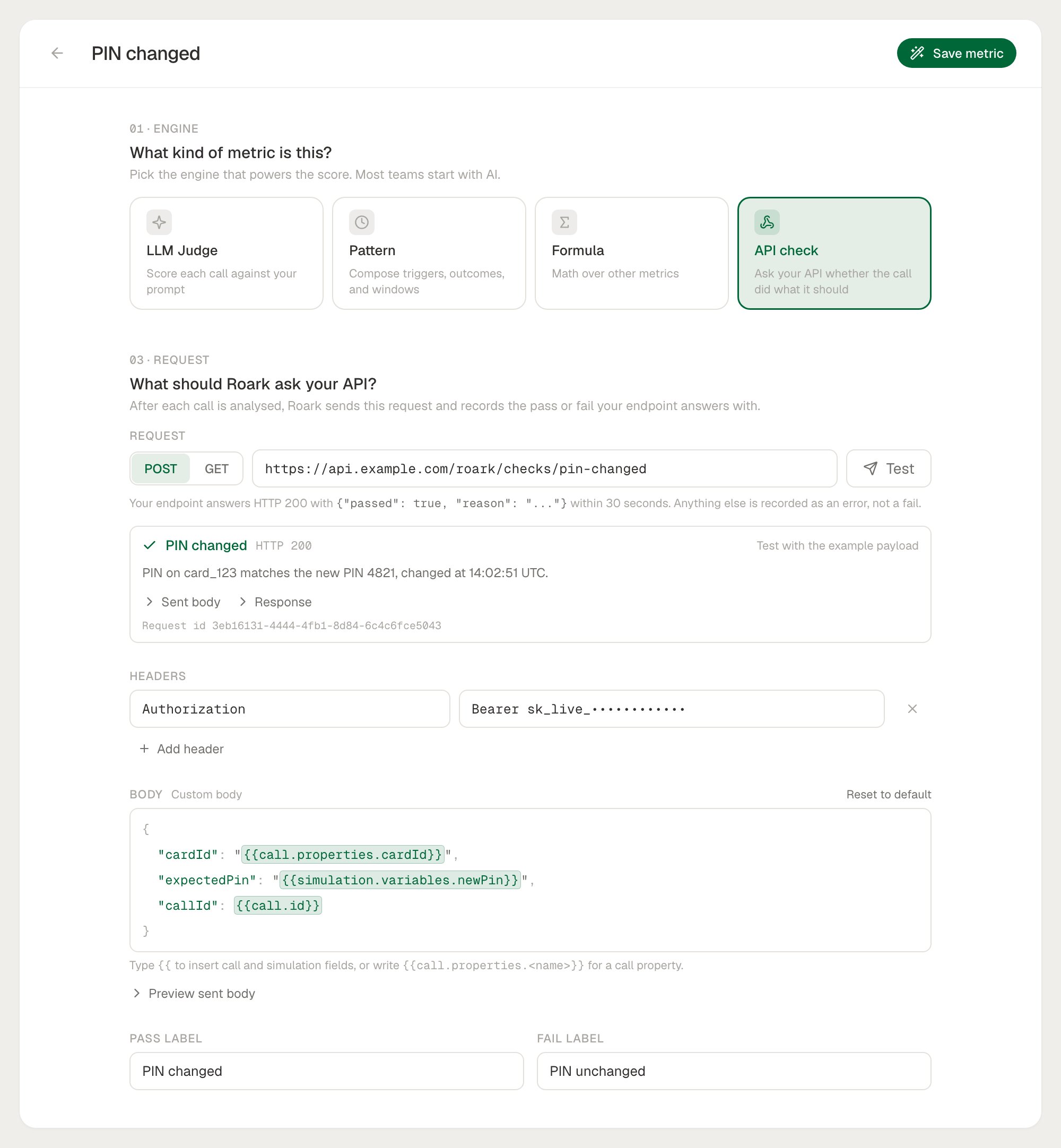
1
Request
Choose
POST or GET, enter your endpoint URL, and add any headers your API needs, such as an Authorization header. Type {{ in the URL, a header, or the body to insert a placeholder.2
Body
Leave the body as it is to send the default payload, or edit it into the JSON your endpoint expects. Turn on Preview sent body to see the body with its placeholders filled in for an example simulated call.
3
Test
Click Test next to the URL to send the request once, filled from the example payload. Studio shows the result (Pass, Fail, Error, or Not sent), the HTTP status, your reason, the body it sent, and your endpoint’s response. Nothing is saved, so you can test before the metric exists.
4
Labels
Name the two outcomes, for example PIN changed and PIN unchanged. They default to Pass and Fail.
How It Works
1
2
Roark sends your request
Roark fills your URL, headers, and body with data about the call and sends it. With no body, Roark POSTs the default payload.
3
Your endpoint answers
Your endpoint replies
200 with { "passed": true | false, "reason": "..." }. Roark records the result as Pass or Fail, with your reason shown next to it.The Request Payload
With no body, Roark POSTs this payload as JSON. With a custom body, the same payload is what your placeholders read from.
Every request also carries
User-Agent: Roark-Metric-Check/1.0, and Content-Type: application/json on a POST. Headers you set take precedence.
Placeholders
{{path}} placeholders read from the payload above, for example {{call.id}}, {{call.properties.cardId}}, or {{simulation.variables.newPin}}. Roark checks every placeholder when you save, so a typo is caught before any call runs.
How a value goes in depends on where the placeholder sits:
If a call has no value for a placeholder, such as a run variable on a live call or a property the call doesn’t carry, Roark doesn’t send the request. The result is recorded as missing data, never as a fail, and the literal
{{...}} is never sent.
Answering the Check
Reply with HTTP200 and this JSON:
A minimal endpoint:
Errors and retries
Only a200 with passed set is a verdict. Anything else is recorded as an error on the call, not a fail, so your pass rate reflects your agent and not your endpoint’s uptime.
Roark shows your
reason, never your raw response, on the call.
Security
- Authenticate with headers. Add your own
Authorizationor API key header. Header values are redacted in Roark’s request log. - Public URLs only. The URL must be public
http(s). Roark checks it when you save, again after placeholders are filled in, and once more against the resolved address when it connects, so a public hostname that points to a private address is refused. - No redirects. Roark doesn’t follow redirects, so point the URL at the final endpoint.
- Bounded responses. Responses over 64 KB are not read.
Limits
- API checks run on calls only, not chats.
- An API check has no variants: the request is the metric, so edit it on the metric itself.
What’s Next
Studio
Author and test an API check before it runs on calls
Collectors
Run your API check automatically on matching live calls
Run Plans
Attach the check to a simulation and gate a run on it
Variables
Pass run variables your check can compare against