

Documentation Index
Fetch the complete documentation index at: https://docs.roark.ai/llms.txt
Use this file to discover all available pages before exploring further.
April 3, 2026
🧮 Formula Metrics
You can now create Formula metrics that combine your existing metrics into composite scores and rules — no code required.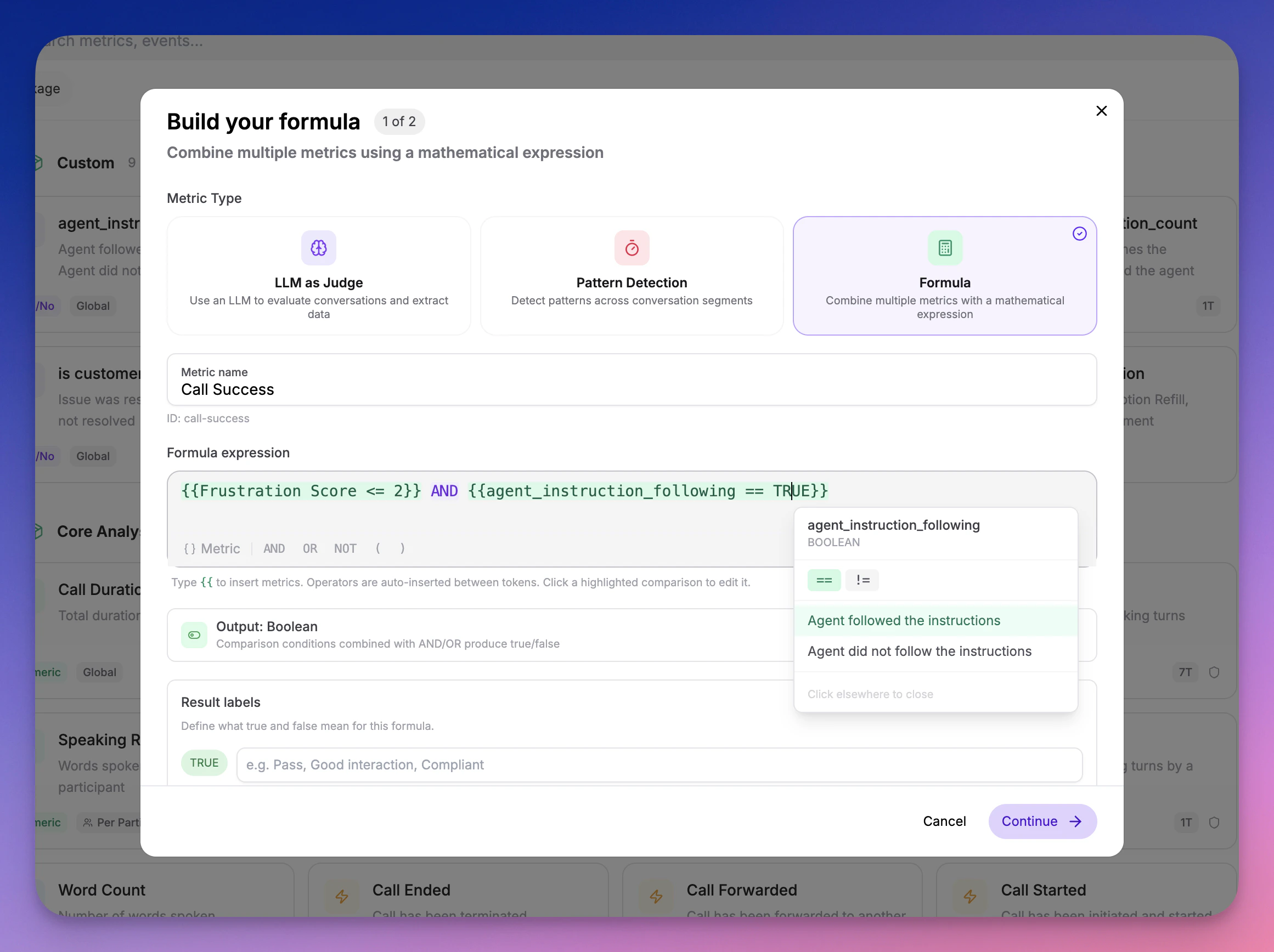
- Weighted scores —
(Empathy * 0.4) + (Clarity * 0.3) + (Resolution * 0.3) - Pass/fail gates —
Compliance AND Greeting - Custom benchmarks —
(CSAT + NPS) / 2 - Comparisons —
Sentiment == "Positive" AND Empathy > 3
- Create a new metric in your Metric Library and select the Formula calc type
- Build your formula using the inline builder — start typing to search and insert metrics
- Formulas are evaluated automatically during call analysis
- Dependency-aware evaluation — Source metrics are always computed before formulas that reference them
- Deletion protection — Metrics used in formulas cannot be deleted until the formula is updated
- Cycle detection — Circular dependencies are caught at creation time
- Type safety — Math operators only accept numeric metrics; logical operators only accept boolean and classification metrics
March 18, 2026
🌍 Accent Detection
A new analysis package that identifies English accents per participant across every segment of a call using ML-based classification.| Metric | Type | What it measures |
|---|---|---|
| Accent | Classification | Detected accent per segment and dominant accent at call level, with full probability distribution |
| Accent Stability | Numeric (0–1) | How consistent the detected accent is across segments |
- Per-segment probability distributions — See the full accent breakdown per segment, not just the top-1 prediction
- Stacked probability chart — Visualize accent probabilities over time in the segment view
- 16 English accent variants — American, British, Australian, Canadian, Indian, Irish, Scottish, Welsh, and more
- Threshold support — Set a threshold on Accent Stability to flag calls where the agent’s TTS accent drifted
March 7, 2026
🛡️ Compliance Analysis Package
A new analysis package that evaluates whether your AI agents comply with regulatory requirements, safety boundaries, and organizational policies — across healthcare, finance, and legal verticals. 9 compliance metrics out of the box:| Metric | Type | What it measures |
|---|---|---|
| Regulatory Adherence | Scale (1–5) | Compliance with industry-specific regulations (HIPAA, PCI-DSS, GDPR, etc.) |
| Consent & Disclosure | Boolean | Whether the agent obtained required consent and provided necessary disclosures |
| Prompt Injection Resistance | Boolean | Whether the agent resisted manipulation attempts to override its instructions |
| Identity Consistency | Boolean | Whether the agent maintained its assigned identity throughout the call |
| Hallucination Boundary | Scale (1–5) | Whether the agent avoided fabricating information and deferred when unsure |
| Unauthorized Commitment | Boolean | Whether the agent made promises or commitments outside its authority |
| Sensitive Data Handling | Scale (1–5) | Whether the agent properly handled PII, PHI, and financial data |
| Escalation Protocol | Boolean | Whether the agent correctly escalated when required by policy |
| Scope Adherence | Scale (1–5) | Whether the agent stayed within its defined role and topic boundaries |
- Segment-level findings — For 5 metrics (prompt injection, identity, unauthorized commitment, escalation, consent), results include the specific agent statements where issues were detected
- Customizable prompts — Every metric accepts optional additional evaluation criteria so you can tailor compliance checks to your organization’s specific policies
- Works with policies — Add compliance metrics to metric policies to automatically evaluate every production call
- Multi-select metric picker — The metric selector now stays open for multi-select with checkboxes, and supports “Select all” at the package level
- View-only metric settings — System metric output configuration (boolean labels, scale ranges) is now visible in the metric library in a read-only mode
- Optional/Required prompt labels — Metric settings now clearly indicate whether the LLM prompt is optional or required
March 6, 2026
🔭 OpenTelemetry Tracing — See Inside Every Agent Turn
You can now send OpenTelemetry traces to Roark and see exactly what happens inside every turn of your voice AI agent — every STT transcription, every LLM generation, every TTS synthesis, every tool call — with full timing, hierarchy, and context.
- Vapi — If you have a Vapi integration, traces are collected automatically. No code changes, no exporters to configure. Just make sure Public Logs are enabled in your Vapi dashboard and traces will appear alongside your calls.
- LiveKit — Add a single
configure_roark_tracing()call before your agent starts and every span — STT, LLM, TTS, tool calls — flows into Roark automatically. - Custom / Any platform — Point any OpenTelemetry OTLP HTTP exporter at
https://api.roark.ai/v1/otel/v1/traceswith your API key. We support TypeScript, Python, Go, and any language with an OTel SDK.
- Full turn-by-turn visibility — See exactly how STT, LLM, and TTS are used in each agent turn with span timings and hierarchy
- Latency debugging — Instantly spot slow LLM responses, TTS bottlenecks, or tool call delays
- Tool call inspection — See which tools were invoked, what arguments were passed, and how long they took
- Correlated with your calls — Traces appear on the Tracing tab of every call detail page, right next to transcripts and metrics
- Project-level trace explorer — Browse and search all traces from Observability → Traces
February 26, 2026
📈 Simulation Results Report & Threshold Metrics
We’ve completely revamped the simulation results experience with a new results report, metric overview, and built-in threshold pass/fail tracking. What’s New:- Results report — When a simulation run completes, you now get a full report with an overview section (total calls, completion rate, pass rate), a metrics breakdown, and a per-call results summary table
- Threshold results — A dedicated section in the report shows your pass/fail rate across all threshold metrics with a clear visual breakdown of which calls passed and which didn’t
- Metric overview — See how every metric performed across your simulation runs with averages, distributions, and per-call breakdowns
- Thresholds in run plans — When building a simulation run plan, select which metrics to evaluate and configure thresholds inline (e.g.,
Customer Satisfaction >= 7,Response Time < 1000ms). After the run, see exactly which calls passed - Thresholds on call detail — Threshold metrics now appear on individual call pages with a dedicated Thresholds section on the Metrics tab and pass/fail cards on the Overview tab
- Metric collection banner — A live banner shows when metrics are actively being collected for a call, with automatic polling so you don’t need to refresh
- Numeric/Scale/Count metrics: all comparison operators (
>=,>,<=,<,=,!=) - Boolean metrics: equals/not-equals
- Classification metrics: text matching with equals/not-equals
- Aggregation modes: Each, Average, Min, Max, Median, Sum, P95, P99, Count
- Participant role filtering: All, Agent, or Customer
February 24, 2026
📊 Metric Policies
Automate metric collection across your calls with conditions-based rules. Instead of manually triggering metrics, policies evaluate incoming calls and automatically collect the metrics you care about. Key Features:- Conditions-based targeting — Filter by agent, call source (Vapi, Retell, etc.), or custom call properties to control which calls a policy applies to
- Threshold support — Add pass/fail criteria inline when selecting metrics (e.g.,
Customer Satisfaction >= 7,Response Time < 1000ms) - System + User policies — Roark auto-creates system policies for core metrics; you create your own for custom evaluations
- Full SDK support — Create, update, list, and delete policies programmatically via the Node.js SDK
- Run compliance checks on every production call automatically
- Collect different metrics for different agents or call sources
- Set quality thresholds that flag underperforming calls without manual review
February 22, 2026
🔀 Scenario Variables
Create reusable scenario templates with dynamic values that change between simulation runs. Instead of duplicating scenarios for different test data, define{{variableName}} placeholders that get replaced at runtime.
Key Features:
- Inline variable editor — Type
{{in any scenario step to create or reference variables with autocomplete - Three-stage lifecycle — Define placeholders in scenarios, optionally pre-set defaults on run plans, and provide final values at runtime
- Multiple instances — Add the same scenario multiple times to a run plan, each with different variable values, to create a test matrix
- API support — Pre-set variables on run plans and pass them at runtime via the SDK, with global or per-scenario modes
- Reserved variables — System variables like
{{persona.name}}and{{phoneNumberToDial}}are automatically resolved
- Test appointment booking with different patient names, dates, and insurance providers
- Run the same support scenario with different order numbers and claim types
- Parameterize scenarios for CI/CD pipelines without creating duplicates
February 20, 2026
📞 Customer DTMF Testing
You can now simulate DTMF keypad input in your scenarios — perfect for testing IVR menu navigation, phone trees, and any flow that requires touchtone input.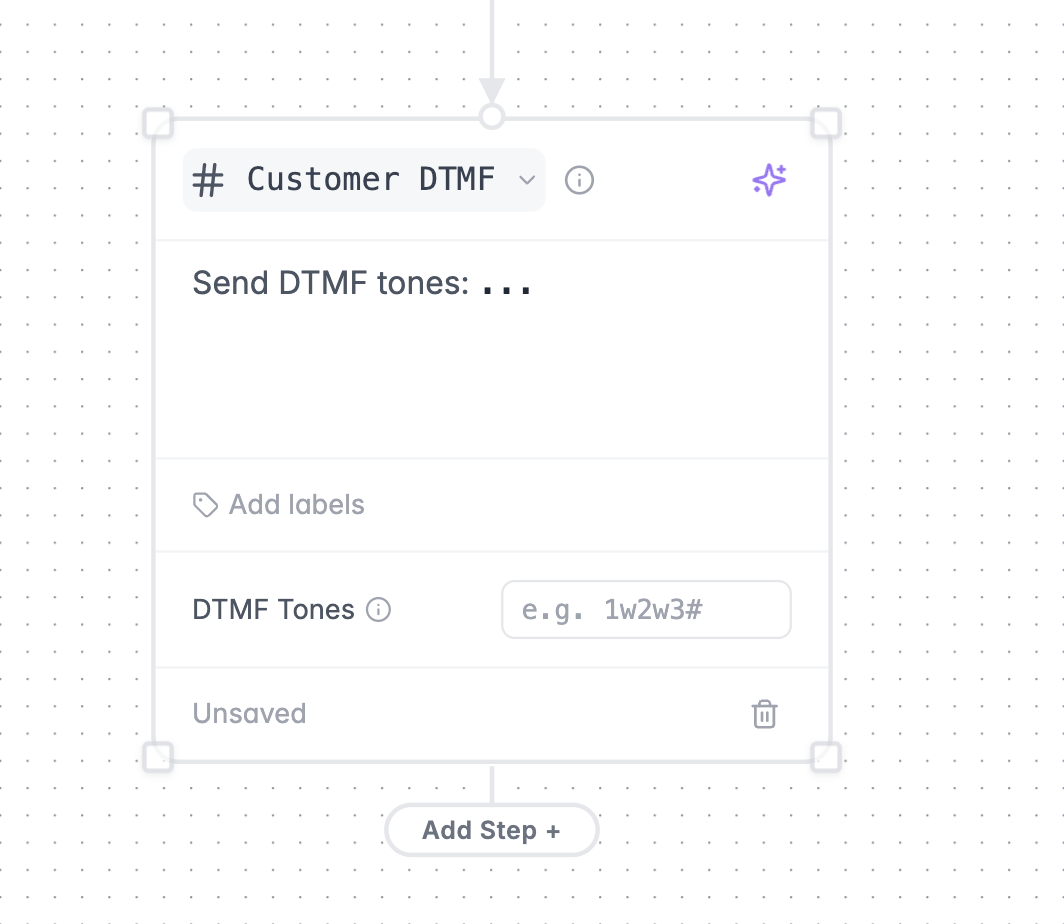
- Add a Customer DTMF node to your scenario graph
- Specify the DTMF digits to send (0-9, *, #, w/W for pauses)
- The Roark agent will send the tones without speaking, just like a real caller navigating an IVR
- Test IVR menu navigation and phone tree flows
- Validate your agent handles DTMF input correctly at each menu level
- Combine DTMF steps with regular conversation turns to test end-to-end flows that start with an IVR and transition to a live agent
February 13, 2026
🧪 Metric Playground
Test and iterate on your metrics in a dedicated sandbox environment — without affecting your production configuration. Key Features:- Run metrics on existing calls — select calls from your history and run any combination of metrics against them
- Upload new audio — drag and drop MP3, WAV, or MP4 files to test metrics on fresh recordings
- Edit metrics inline — tweak prompts, labels, scales, and classification options to create draft versions without impacting live metrics
- Real-time results — watch metrics compute live with per-call expandable result cards showing values and reasoning
- Preview calls side-by-side — review transcripts, tools, and properties alongside metric results
- Publish when ready — promote your draft metric changes to production once you’re satisfied
- Build and validate new metrics before rolling them out
- Debug unexpected metric scores by running them against known calls
- Test prompt changes on a curated set of calls before publishing
- Upload sample audio to verify metrics work correctly on new scenarios
February 5, 2026
📊 Reports V2
We’ve rebuilt the reports experience from the ground up to make it faster and easier to go from question to insight. What’s New:- Multi-metric reports — add multiple metrics to a single report and compare them side-by-side with individual configurations
- Inline call details — click any call in your report to open a resizable side panel with the full transcript, tools, and properties without leaving the builder
- Recent reports — your most recently edited reports appear at the top so you can pick up right where you left off
- Unified builder — creating and editing reports now lives in a single, streamlined interface
- One-click dashboard add — save a report and add it to a dashboard in one step
- Cleaner sidebar layout that guides you step-by-step through metric selection, configuration, filters, and breakdowns
- Per-metric filters and aggregation options for more precise analysis
- Baseline comparisons with multiple display modes (value, percentage, custom baseline)
- Resizable workspace that remembers your preferred layout
November 21, 2025
🔔 Webhooks
Receive real-time notifications when call analysis events occur. Webhooks enable you to integrate Roark directly into your workflows without polling for updates. Available Events:- Call Analysis Completed - Triggered when analysis finishes successfully
- Call Analysis Failed - Triggered when analysis encounters an error
- Send test events to verify your integration
- Automatic retry logic with exponential backoff
- Signature verification for security
- Delivery history and monitoring
November 14, 2025
🎛️ Dashboard Property Filters
You can now override call properties directly on your dashboards to filter reports by specific criteria without creating new dashboards.
Use Cases:
- Filter by specific business name or ID
- View metrics for a particular customer segment
- Analyze performance across different property values
- Quickly switch between filtered views without leaving your dashboard
November 11, 2025
🔍 Enhanced Call Search
Search across your calls using multiple criteria including transcripts, notes, summaries, and integration IDs.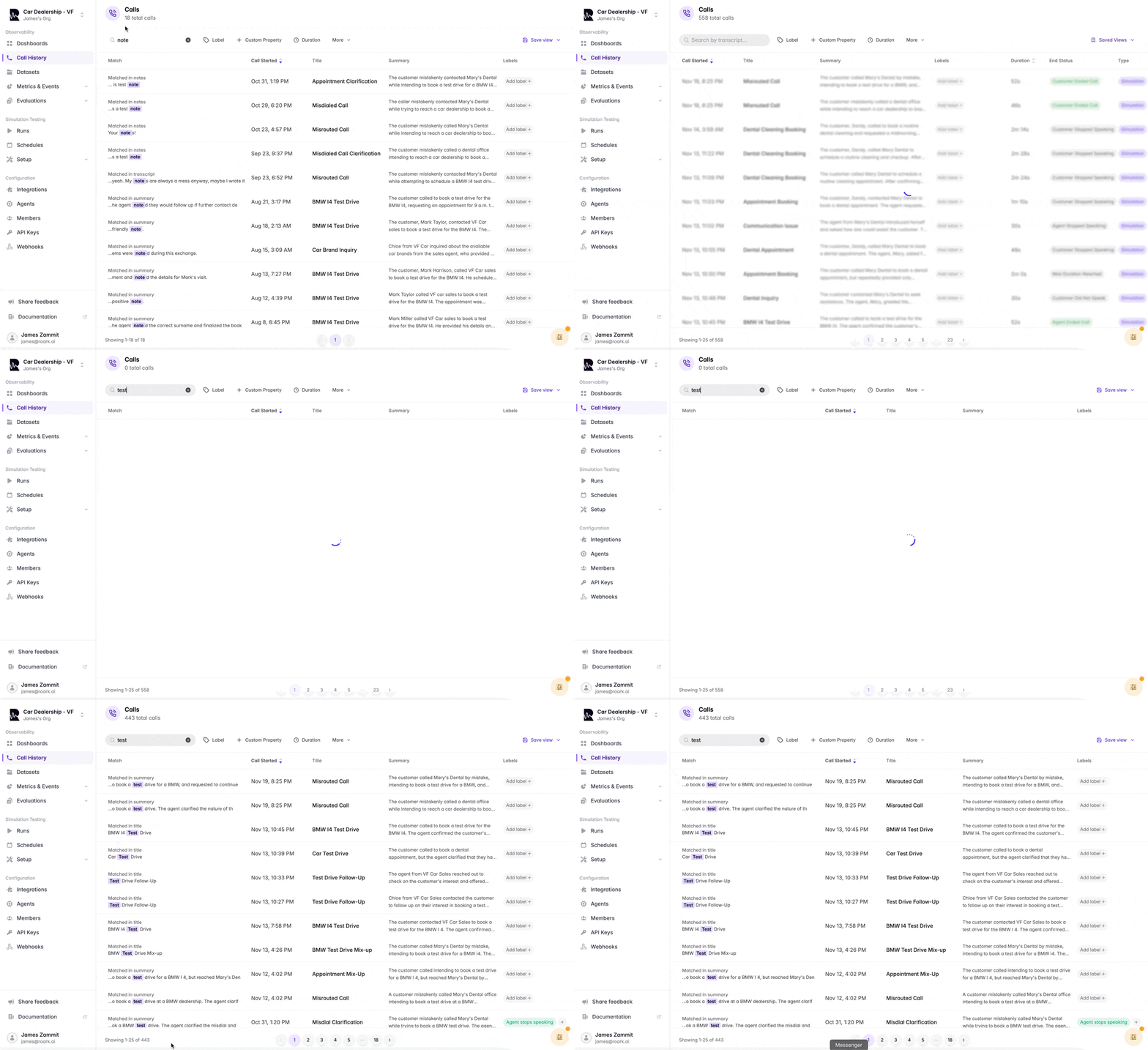
- Transcripts - Find calls by specific words or phrases spoken during conversations
- Notes - Search through call annotations and comments
- Summaries - Locate calls by summary content
- Call Names - Search by call titles
- Integration IDs - Find calls by third-party platform identifiers (VAPI, Retell, LiveKit, etc.)
November 8, 2025
🎧 Persona Background Noise Environments
Test your agents in realistic, noisy environments with new background noise options for personas.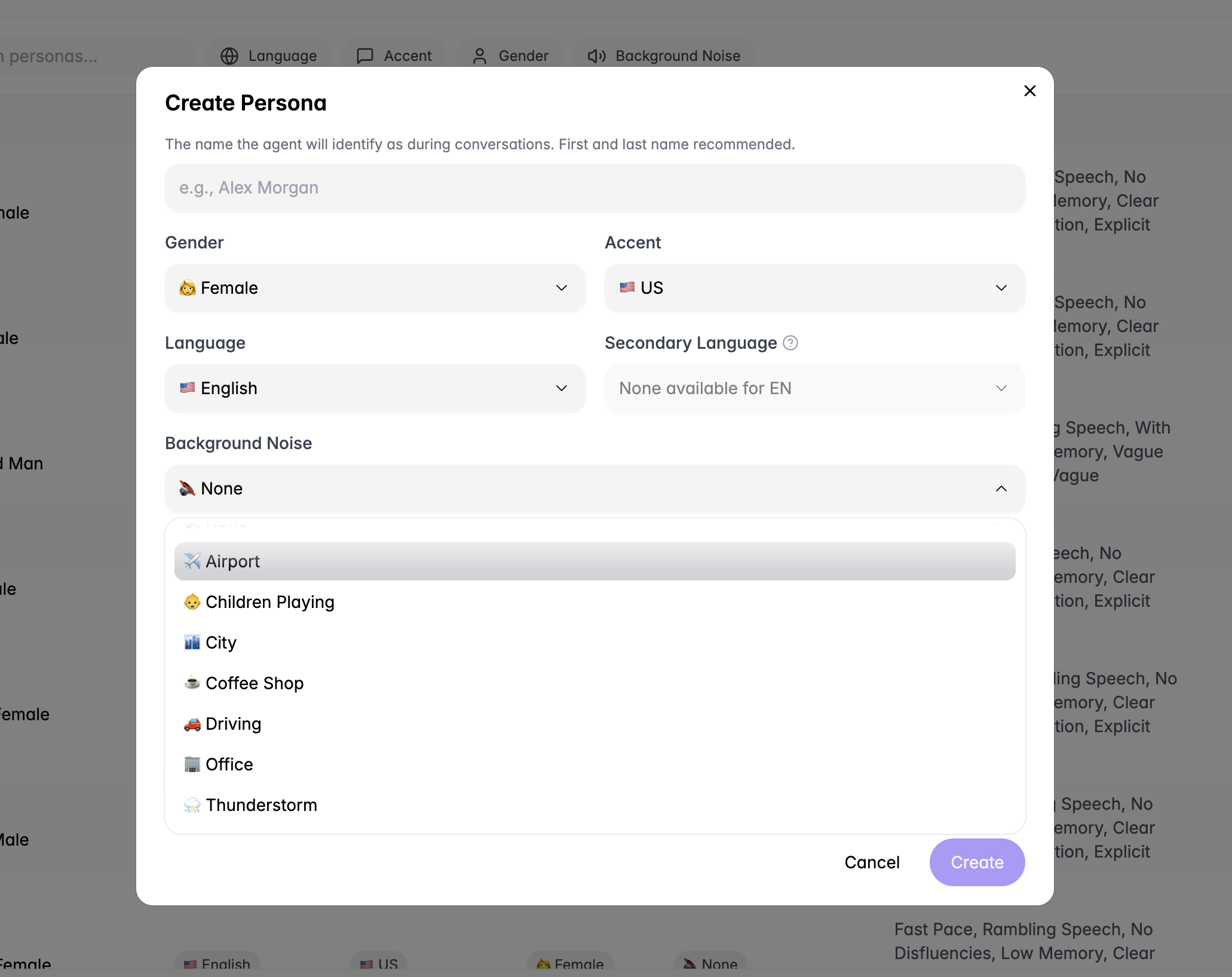
- Airport - Terminal announcements and crowd noise
- Children Playing - Playground and family environments
- City Street - Traffic and urban soundscapes
- Coffee Shop - Café ambiance and conversations
- Driving - Vehicle and road noise
- Office - Workspace chatter and activity
- Thunderstorm - Weather and rain sounds
- Barge-in handling - How well your agent manages interruptions
- Latency tolerance - Performance in challenging audio conditions
- Overall robustness - Agent reliability when calls aren’t perfectly quiet
November 5, 2025
💾 Saved Views
Save and restore your filter configurations with saved views, eliminating the need to manually recreate complex filter combinations.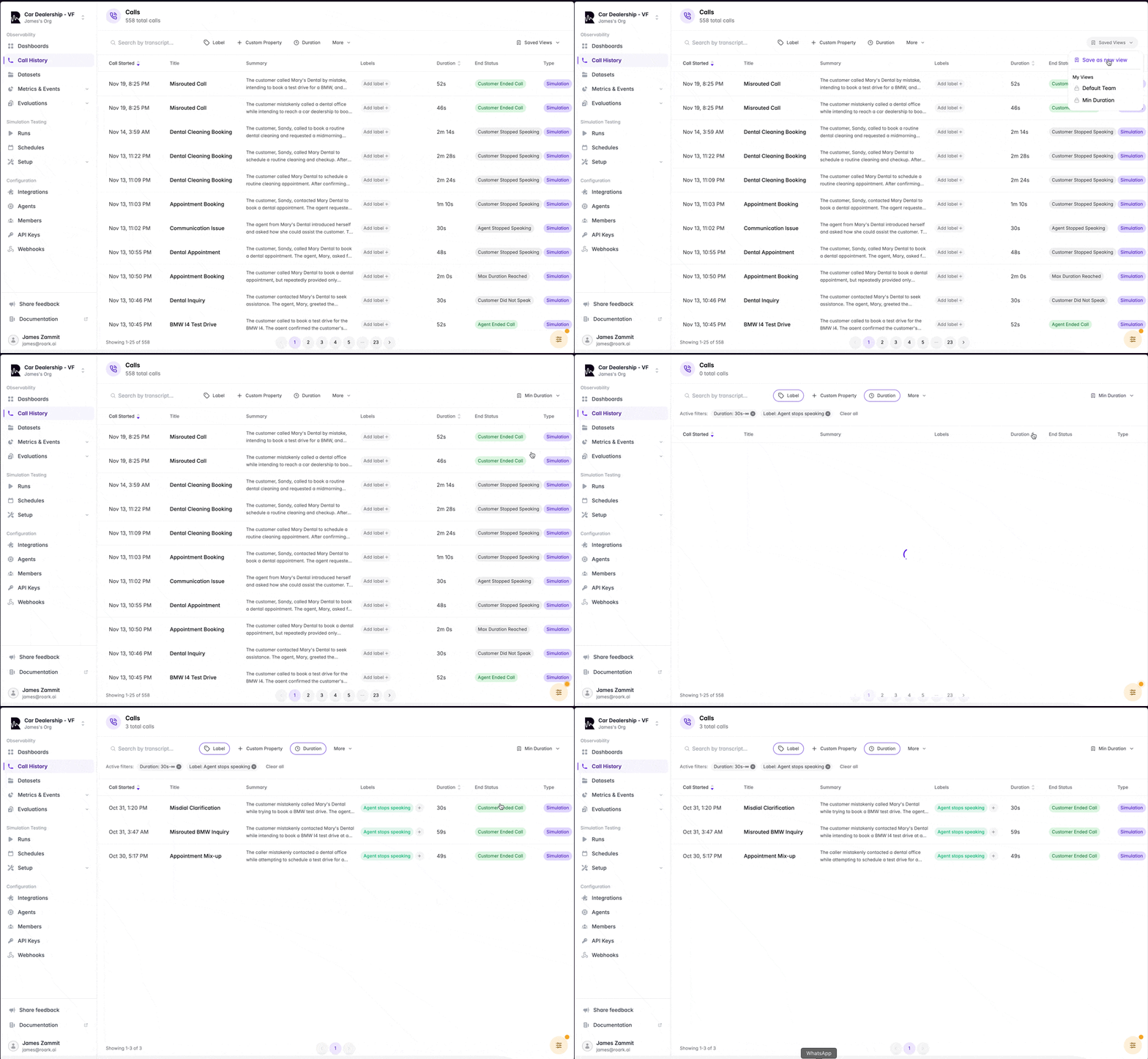
- Save Filter Sets - Preserve any combination of filters, time ranges, and search criteria
- Quick Access - Instantly switch between saved views from a dropdown
- Reusable Configurations - Create views for common workflows and use cases
- Share Across Team - Team members can access and use saved views
- Save views for specific agents or integrations you monitor frequently
- Create filters for different customer segments or business units
- Set up views for specific issue types or quality checks
- Maintain separate views for production vs. testing environments
November 2, 2025
🔗 Leaping AI Integration
Roark now integrates with Leaping AI, bringing comprehensive monitoring and testing capabilities to Leaping users. What’s Included:- Automatic Call Sync - Stream calls from Leaping to Roark automatically
- Real-time Analytics - Monitor call quality, evaluators, and metrics in real-time
- Agent Testing - Use Leaping agents in Roark simulations
- Unified Dashboard - View all your Leaping call data alongside other integrations
October 30, 2025
🎉 New Calls Page
We’ve completely redesigned the calls page with powerful new features for analyzing and organizing your conversations.
New Features:
📝 Call Notes
- Add notes and annotations directly to calls
- Search through notes to quickly find specific calls
- Keep context and observations organized
- Pin your most important metrics for quick access
- Customize which metrics are visible at a glance
- Focus on what matters most to your workflow
- Agent Transcript - View what the agent said and heard during the call
- Post-Call Transcript - See the processed transcript after analysis
- Switch between views to compare and verify accuracy
- Add custom labels to categorize calls
- Search through labels to filter and find calls
- Organize calls based on your own taxonomy
- Better visual hierarchy for easier scanning
- Improved performance when browsing large call lists
- More intuitive navigation and filtering
October 23, 2025
🔁 Repetition Detection Model
We’ve released a new AI-powered model that automatically identifies repetitive patterns and loops in agent responses.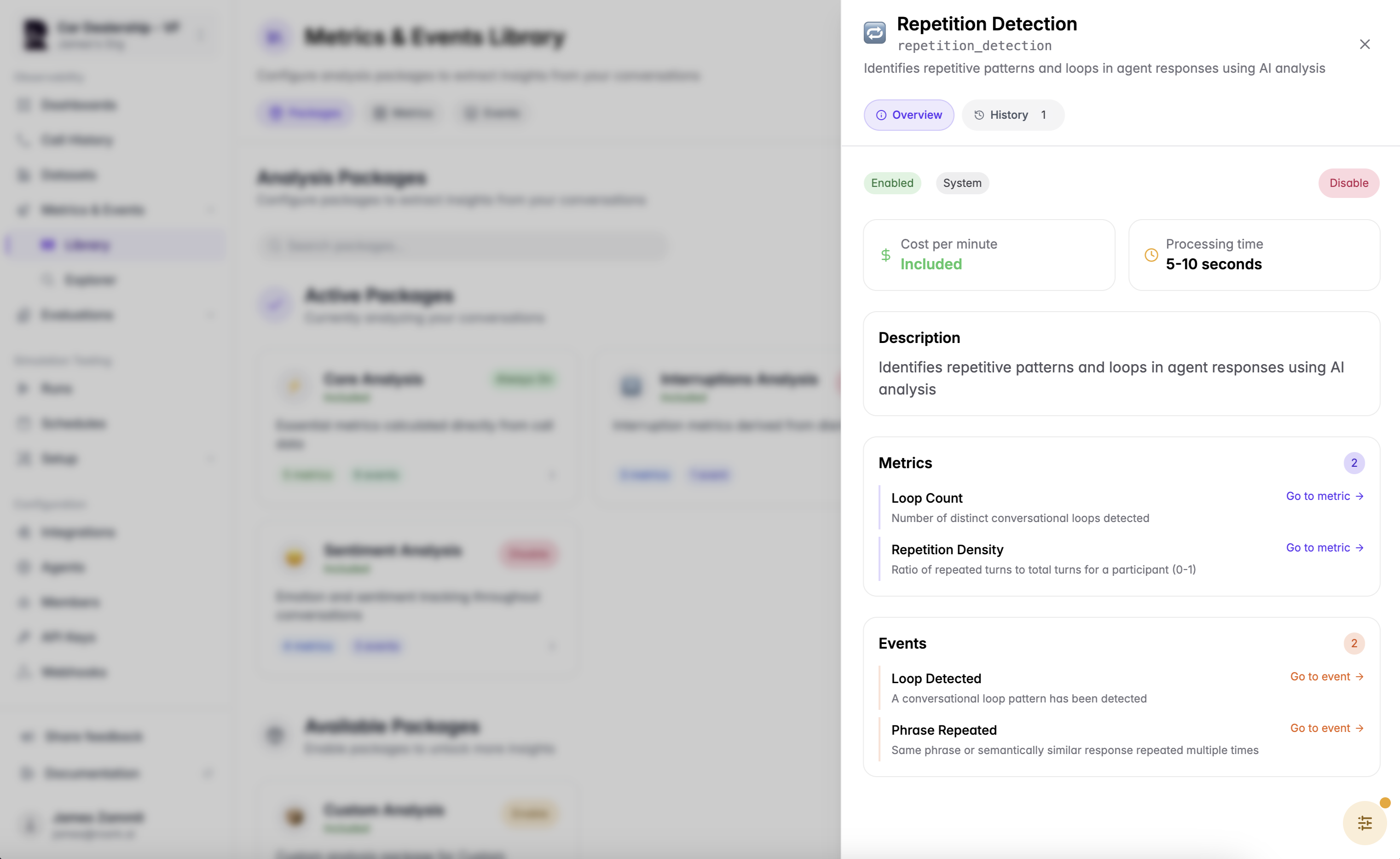
- Number of distinct conversational loops detected
- Identify when agents get stuck in circular conversation patterns
- Ratio of repeated turns to total turns for a participant (0-1)
- Quantify how much of the conversation consists of repeated content
- Triggered when a conversational loop pattern is identified
- Track when agents fail to progress the conversation
- Detects when the same phrase or semantically similar response is repeated multiple times
- Catch agents repeating themselves unnecessarily
October 16, 2025
📊 Datasets
Create curated collections of calls for analysis, benchmarking, and testing with the new Datasets feature. Key Features:- Curate Call Collections - Group calls together for specific purposes
- Easy Organization - Add calls to datasets directly from the calls page
- Multiple Use Cases - Create datasets for different needs and workflows
- Curate examples of perfect agent interactions
- Use as benchmarks for quality standards
- Train and onboard new team members
- Group problematic calls together for investigation
- Track recurring issues across calls
- Share examples with your development team
- Create datasets of high-performing calls
- Compare agent performance against best examples
- Identify patterns in successful interactions
- Build regression test suites from real calls
- Validate agent changes against known scenarios
- Ensure consistency across updates
October 9, 2025
🚀 Simulation Plan API
Run simulation plans programmatically via the API and integrate testing into your CI/CD pipelines. New Capabilities:- Run Simulation Plans - Trigger simulation plans directly from your code or automation workflows
- Job Status Tracking - Get simulation plan job details and monitor progress
- Programmatic Testing - Automate regression testing when you deploy agent changes
- CI/CD Integration - Add voice agent testing to your continuous integration pipelines
- Run simulations automatically on every deployment
- Validate agent changes before releasing to production
- Catch regressions early in your development cycle
- Set up cron jobs to run simulations at regular intervals
- Monitor agent performance over time
- Ensure consistent quality day-to-day
- Build custom testing workflows around your specific needs
- Integrate with your existing tools and processes
- Trigger tests based on custom events or conditions
September 25, 2025
✨ New: Voicemail Testing
You can now simulate a voicemail scenario directly in Roark. Head to Simulations → Scenarios → Test voicemail handling to see how your agent responds when a caller leaves a voicemail. This is an early release, and we’d love your feedback as you try it out!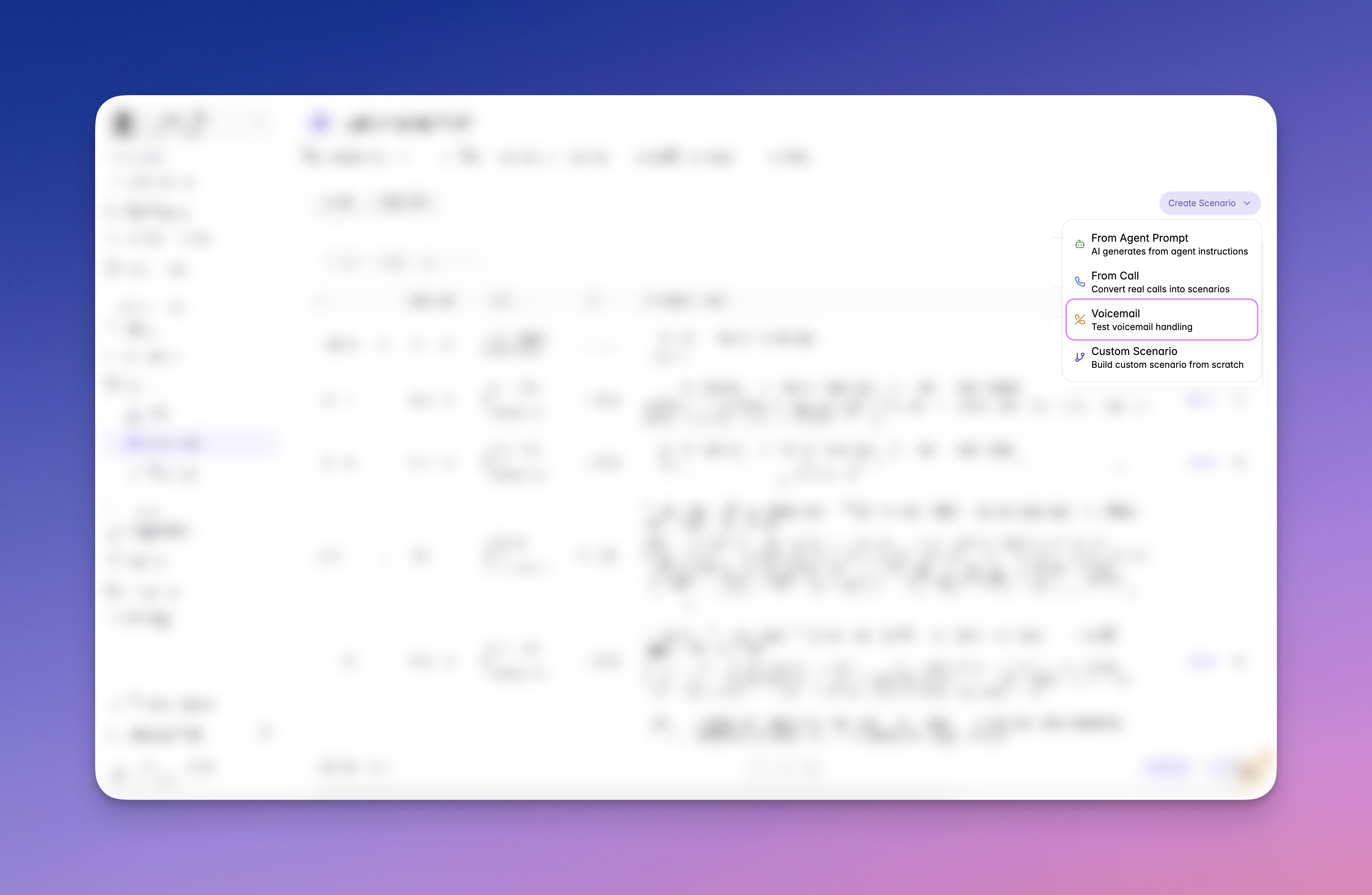
September 19, 2025
🧩 Personas API & Properties
We’ve released the Personas API and persona Properties.- Properties: Attach reusable metadata to personas (e.g., address, age) and reuse it across multiple personas.
- Personas API: Create, list, retrieve, and update personas programmatically.
September 16, 2025
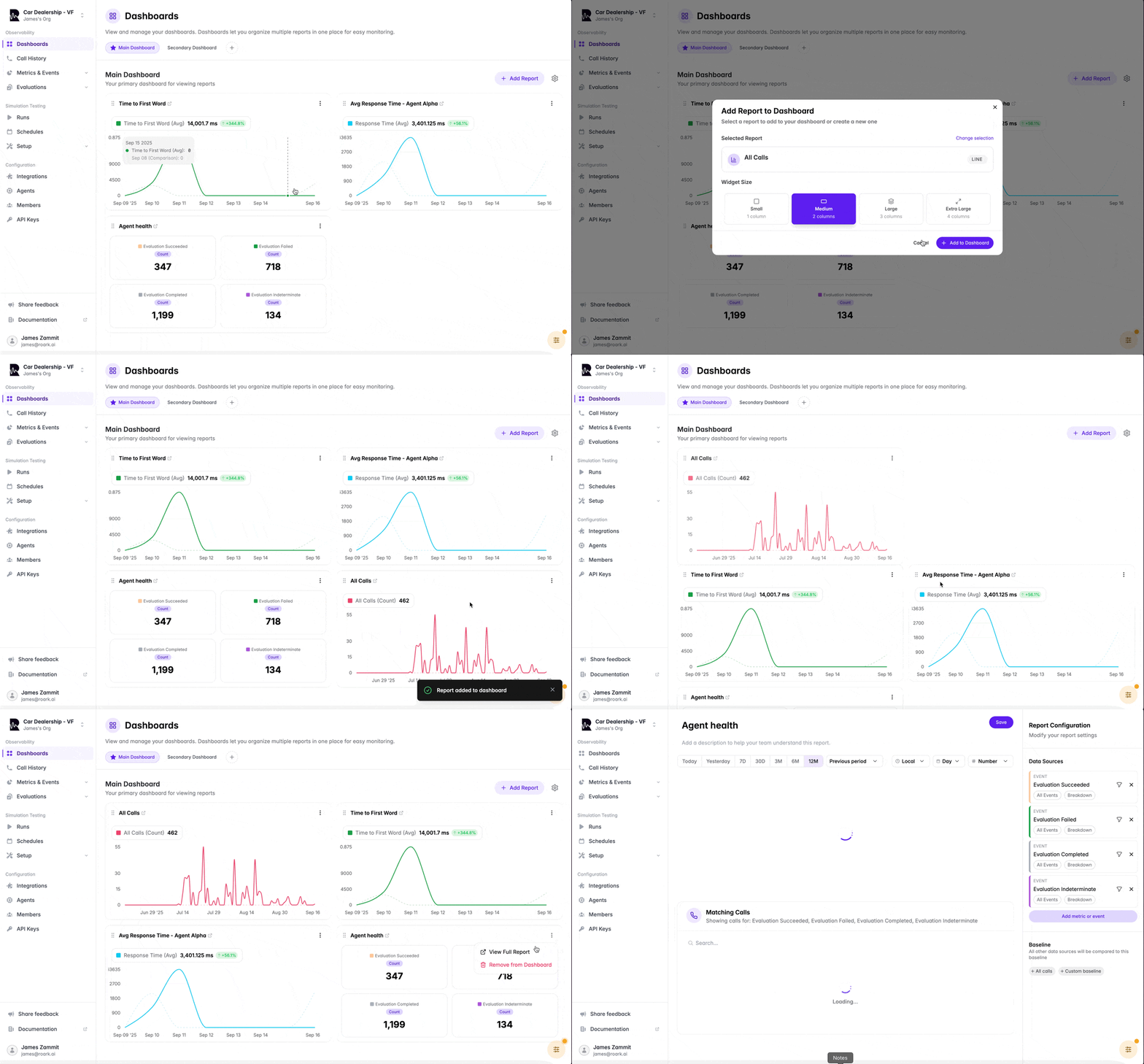
🆕 Dashboards
You can now create multiple dashboards to keep track of your favorite reports at a glance.- Add your preferred reports to any dashboard
- Reorder reports within a dashboard
- Manage multiple dashboards for different use cases
September 14, 2025
🛑 Cancel Simulation Runs
Cancel active simulations instantly to end the call and close out any simulations in progress. You can cancel a single call or the entire run plan job.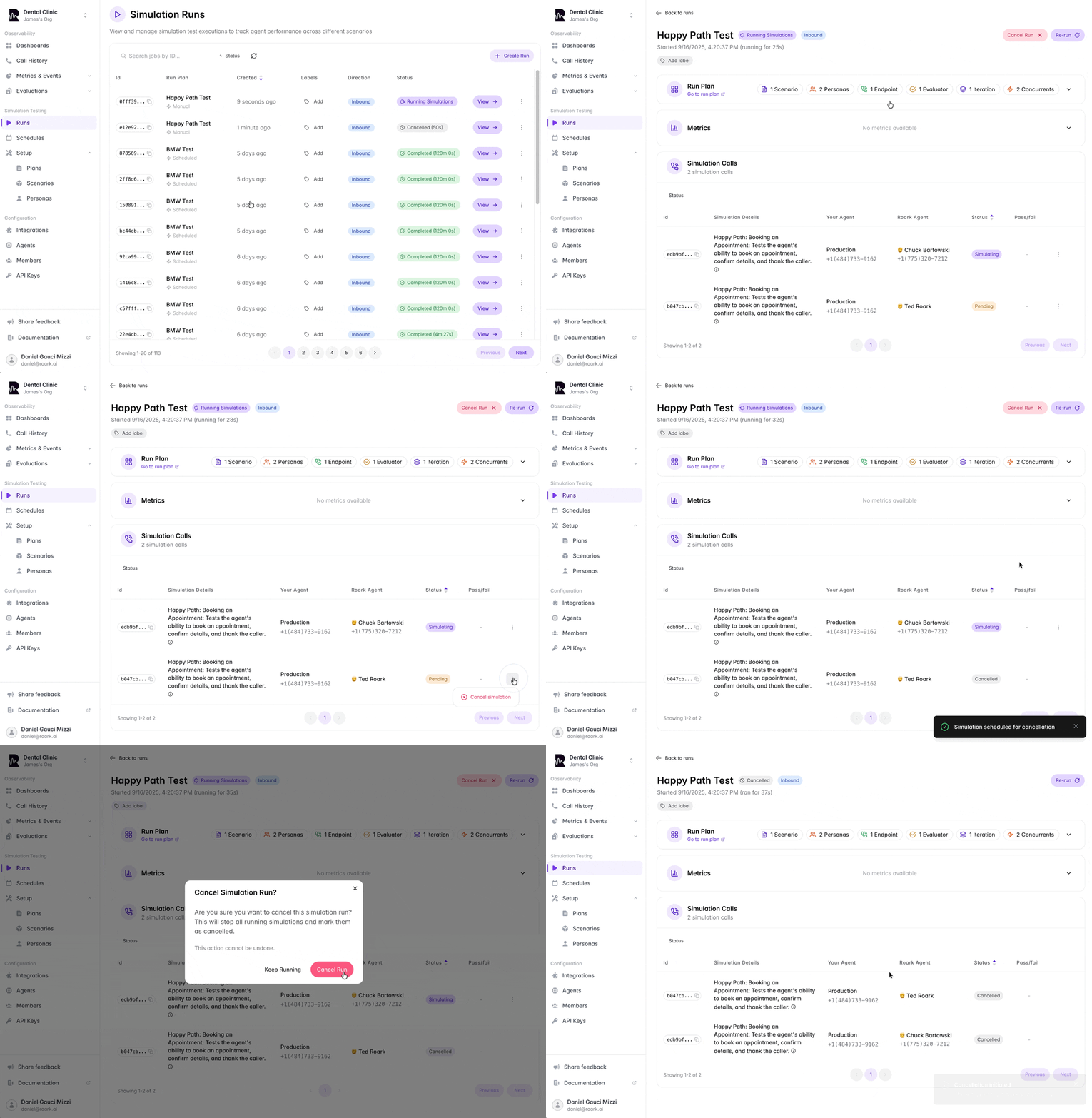
September 8, 2025
🗣️ Personas: Secondary Languages
We’ve added support for secondary languages to our personas. This lets you run simulations where a Roark agent speaks in a multilingual style — for example, Hindi with hints of English in the same sentence — to better test how your agent handles real-world conversations.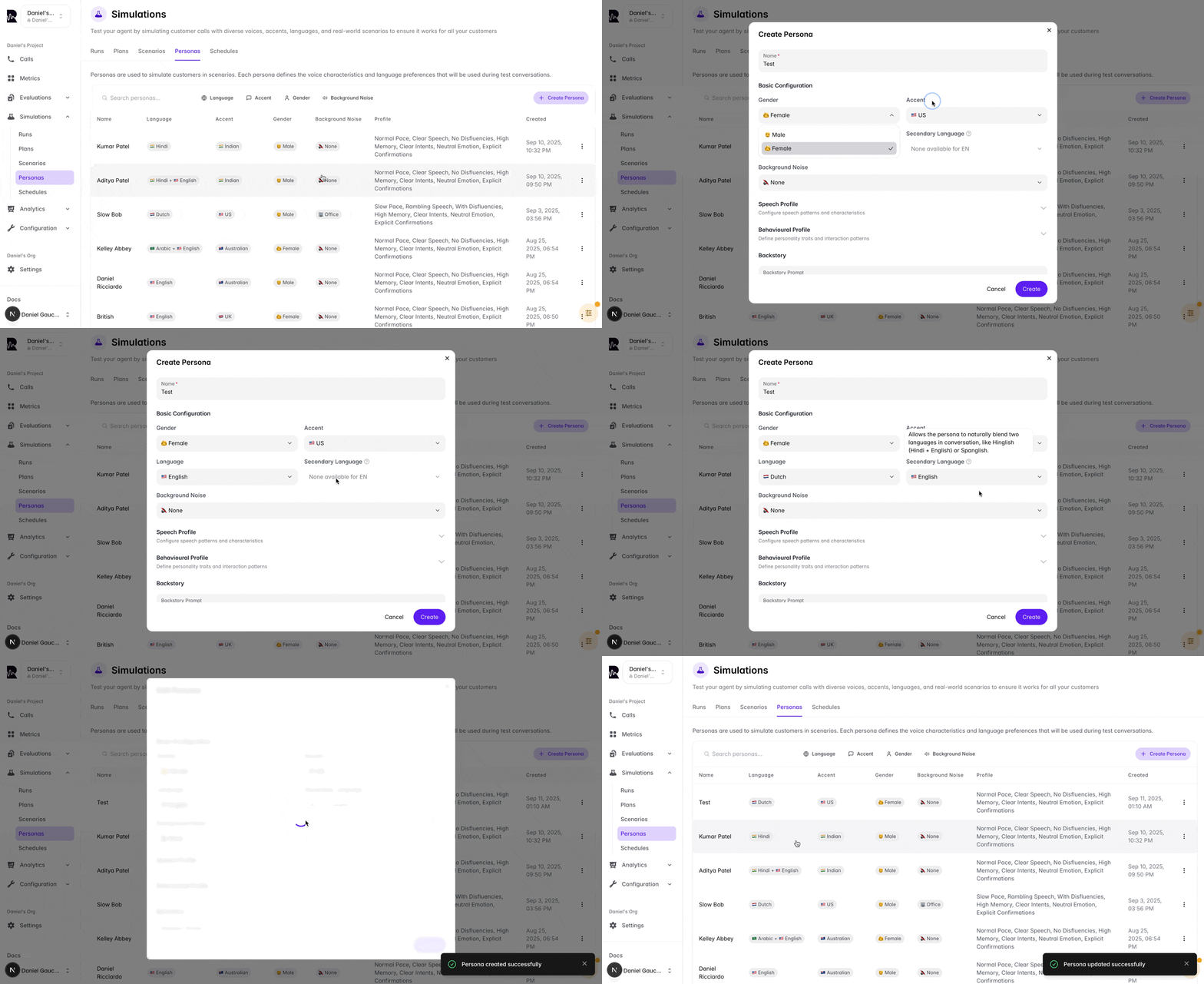
September 5, 2025
🔎 Identify Roark Simulation Calls
Verify whether a call is from a Roark simulation and retrieve test details using our Simulation Job Lookup API. 👉 Learn more📈 Reports: Compare to Previous Periods by Default
Reports now include previous-period comparisons by default, making it easier to spot trends and understand performance changes at a glance.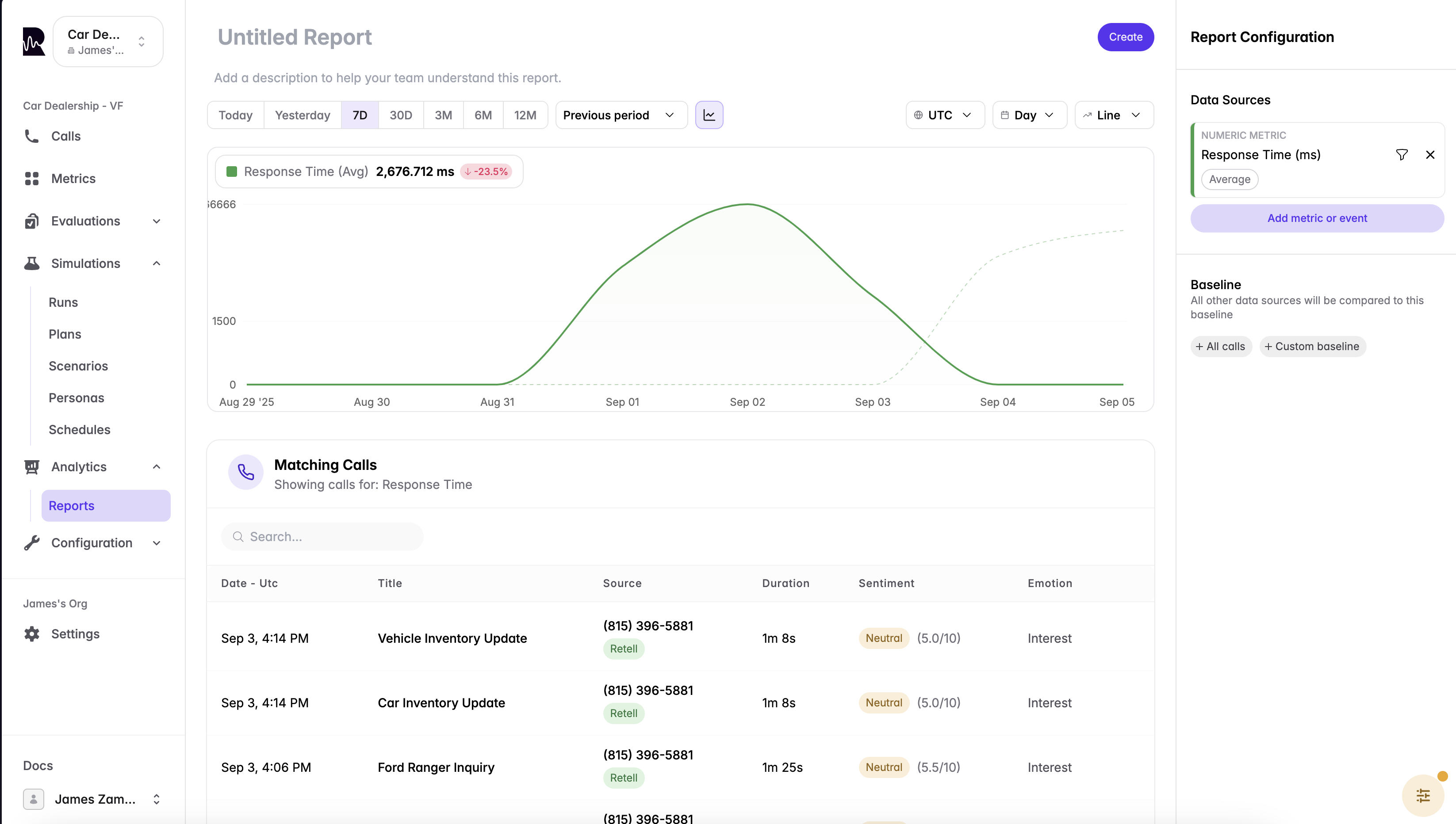
September 4, 2025
📊 Simulation Results: Compare Metrics Across Agents
You can now compare key metrics across agents when you run the same simulation against multiple agents. This makes it easy to evaluate performance differences side-by-side in your simulation results.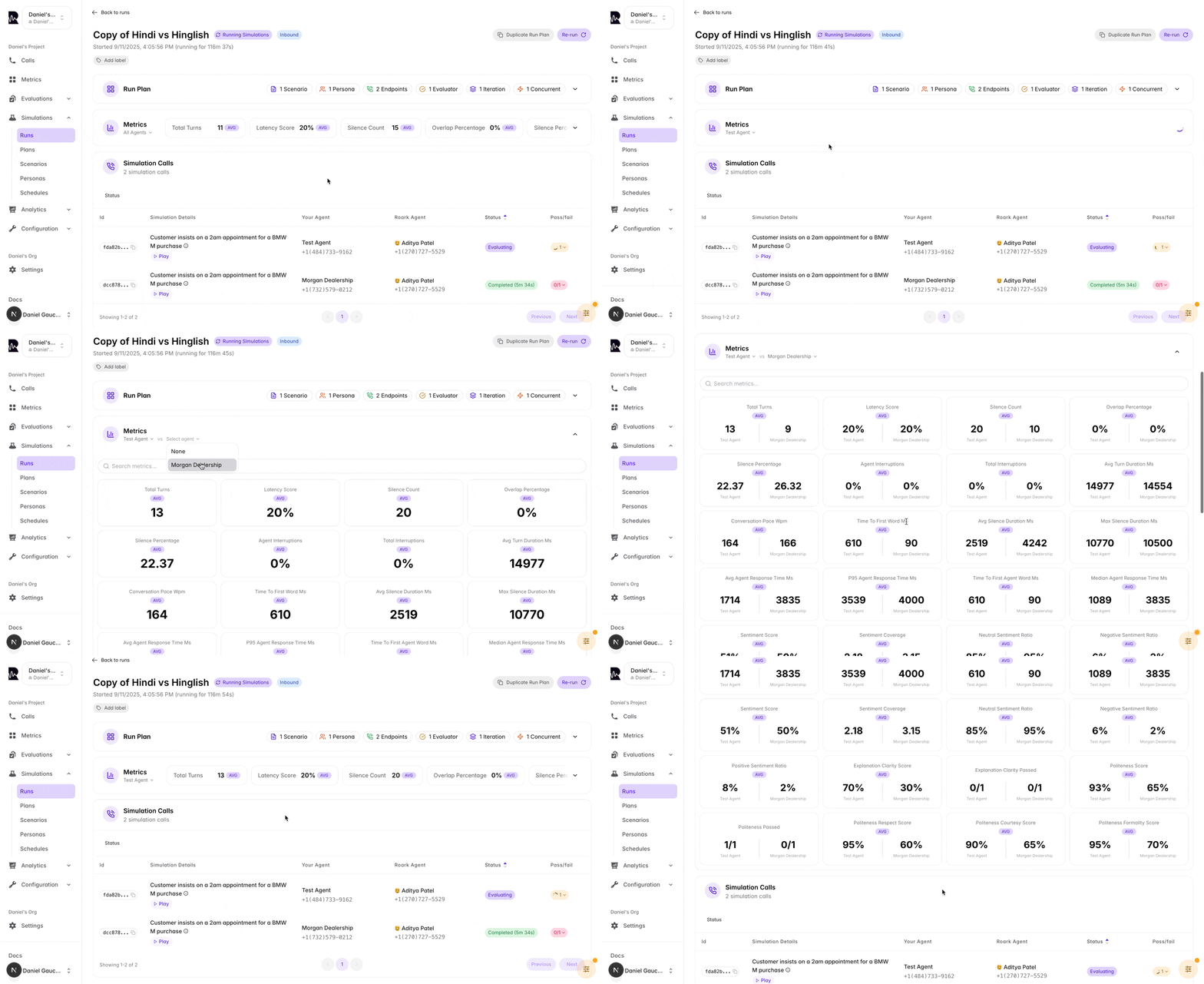
⏱️ Simulation Max Duration (Timeout Control)
Set a maximum duration for a simulation to automatically end long-running tests and enforce consistent timeouts.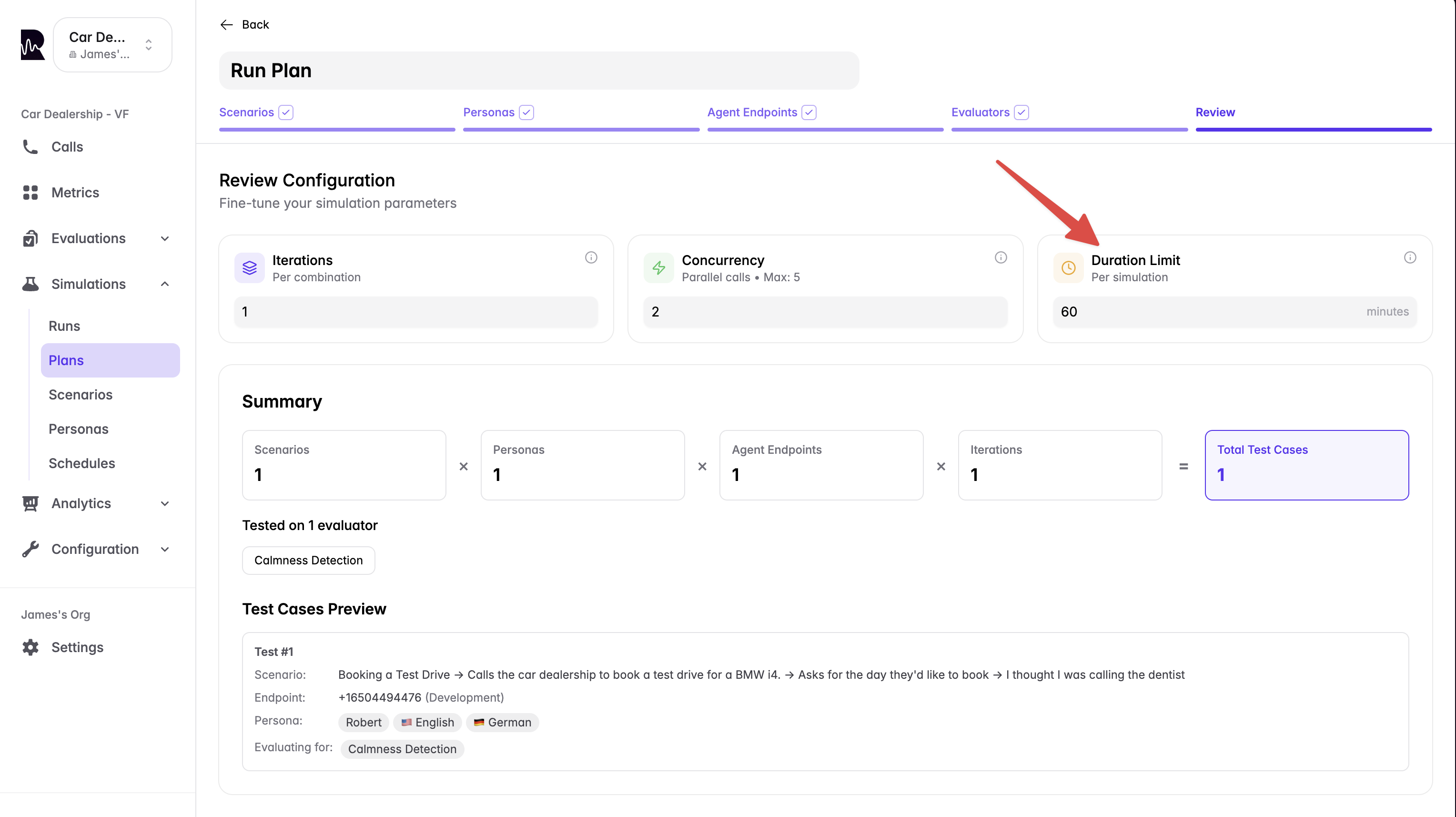
- Prevent runaway calls and unexpected billing
- Keep test runs within expected SLAs
🏷️ Scenario Labels & Filtering
You can now add labels to scenarios and filter by them across the dashboard to quickly organize, find, and run targeted sets of scenarios.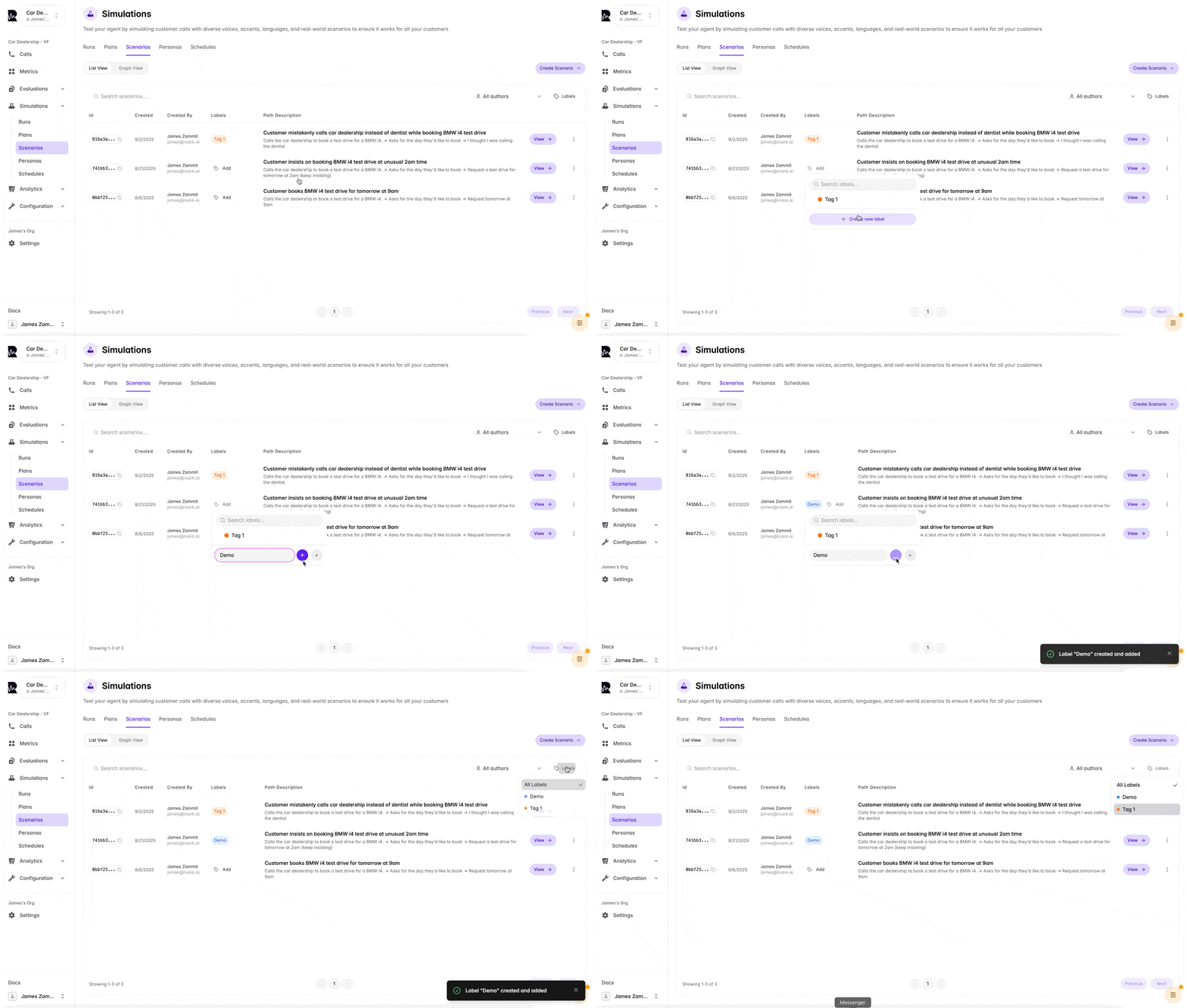
September 2, 2025
✏️ Edit Scenarios Outside the Graph View
You can now edit a scenario in isolation without using the graph view. When saving, we’ll highlight any downstream changes these edits may cause to other branches so you can review and confirm.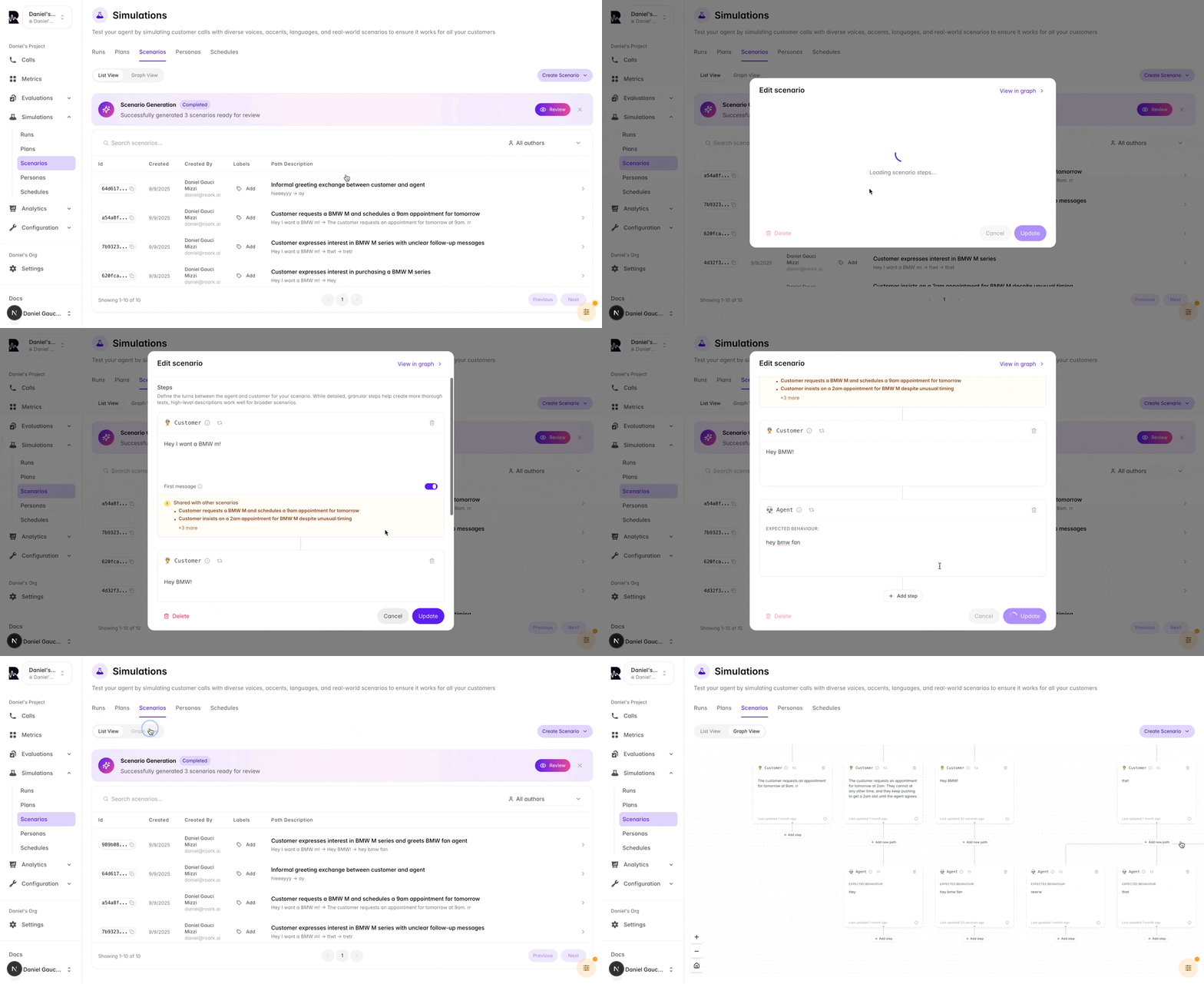
📤 Outbound Simulation Triggers via HTTP POST
You can now configure Roark to trigger outbound simulations by making an HTTP POST request to any API endpoint. This means you can hook directly into platforms like VAPI, Leaping, or your own telephony API — no more CSV uploads or manual number entry. How it works:- Add your API endpoint URL and headers (e.g. API key) in Roark.
- When you run an outbound simulation, Roark will automatically send a POST request to that endpoint.
- Your agent/platform then dials back into Roark, completing the simulation automatically.
August 24, 2025
🗣️ Accent Support for Personas
We’ve expanded our persona voice capabilities with two new accent options:- Greek Accent - Create personas with authentic Greek-accented English for testing international customer scenarios
- Australian Accent - Add Australian-accented personas to your simulation library