> ## Documentation Index
> Fetch the complete documentation index at: https://docs.roark.ai/llms.txt
> Use this file to discover all available pages before exploring further.
# Voicemail Testing
> Check that your agent notices it has reached voicemail, leaves a usable message, and hangs up
## Overview
An outbound agent that dials a real customer will reach voicemail regularly. What it does next is worth testing on its own: a good agent recognises it isn't talking to a person, leaves a complete message, and hangs up. A bad one waits for a reply that never comes, talks over the greeting, or leaves a message no one can act on.
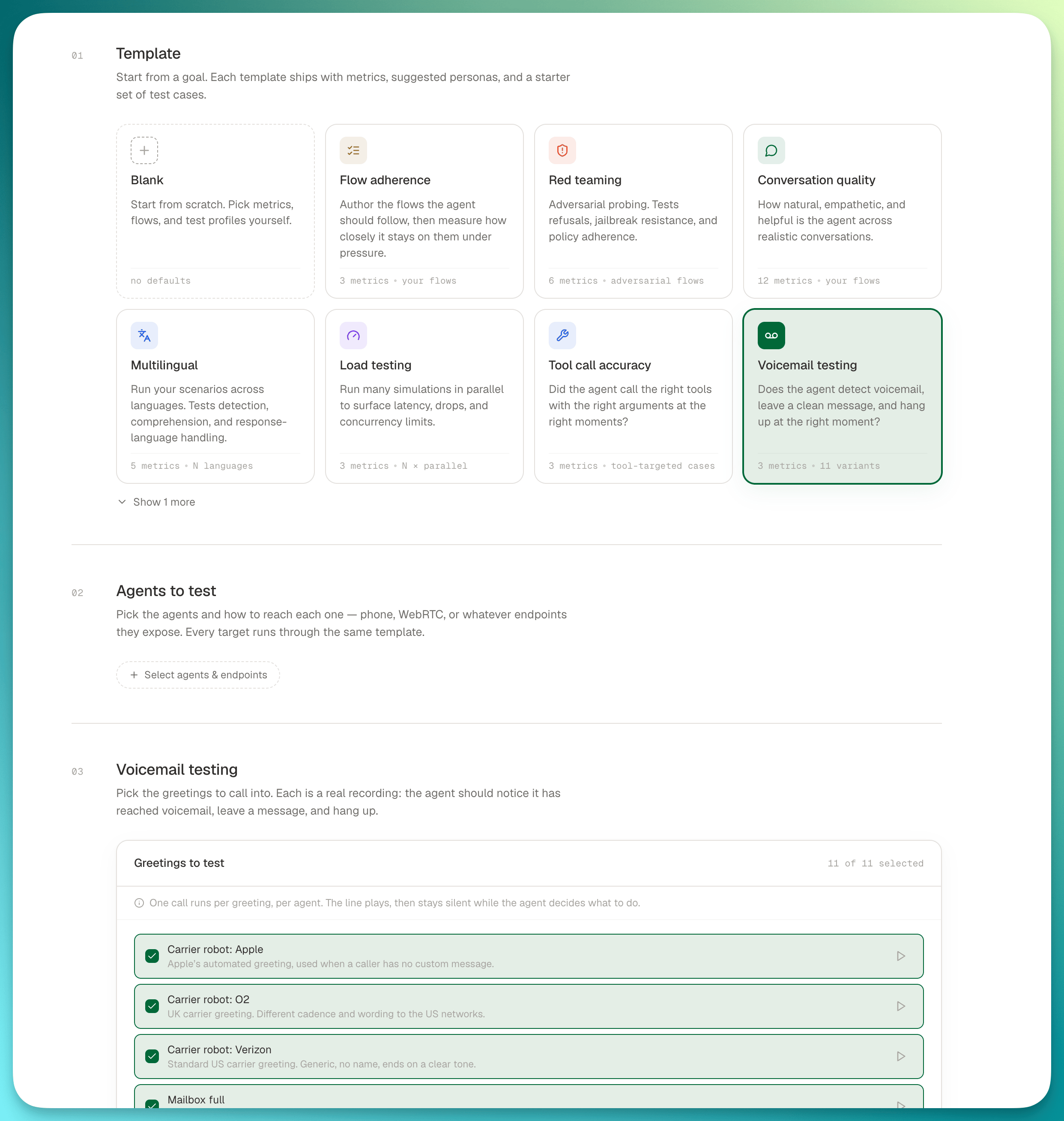
**Voicemail testing** is a run template. Pick it, choose which greetings to call into, and run. There is nothing else to configure, because a voicemail has nothing to configure. No script, no persona, no conversation: a recording plays, then the line stays silent while your agent decides what to do.
 ***
## Running a voicemail test
On [create a run](/documentation/simulation-testing/run-plans), choose **Voicemail testing** in step 01.
Step 02 as usual. Voicemail is **voice-only**: a greeting is audio, so a chat endpoint has nothing to play. Attaching one is rejected before the run starts.
Step 03 is a **Greetings to test** checklist. Every greeting is selected by default; untick the ones you don't need. Each row has a play button so you can hear the recording before you commit to a run.
One call runs per selected greeting, per agent. Ten greetings against two agents is twenty calls.
The call count multiplies. Leaving every greeting selected across several agents adds up quickly, so untick down to the greetings you actually care about if you're iterating.
***
## What happens on the call
Each call follows the same shape:
1. Roark dials your agent (or answers it, for an inbound endpoint).
2. The selected greeting plays as the first thing your agent hears: a real recording, not synthesised speech.
3. The line then goes **completely silent**. The simulated caller says nothing for the rest of the call, and won't interrupt.
4. The call ends when your agent hangs up, or after 15 seconds of silence once it stops speaking.
That silence is the test. Everything Roark grades is a property of what your agent does into a line that never answers back.
Because voicemail calls are short by construction, the template lowers the run's **max duration** default to two minutes. A hung call fails fast instead of billing the usual fifteen.
***
## The greetings
Roark ships a fixed set of real voicemail recordings, covering the shapes an outbound agent meets in the wild:
| Family | What it is |
| :--------------------- | :------------------------------------------------------------------------------------------------------ |
| **Carrier robots** | The automated greetings networks play when a subscriber has set no personal message: Verizon, O2, Apple |
| **Mailbox full** | A carrier notice that there's no room to leave a message at all |
| **Personal greetings** | Real people recording their own outgoing message, across a range of voices, accents, and lengths |
**Mailbox full is the interesting one.** There's nowhere to leave a message, so an agent that launches into its script anyway is doing the wrong thing. The correct behaviour is to recognise it and hang up.
These are Roark-managed and read-only: you can select and preview them, but you can't add your own or edit the set.
***
## What gets measured
The template attaches three [system metrics](/documentation/metrics/system-metrics#voicemail-detection):
| Metric | What it answers |
| :----------------------------- | :----------------------------------------------------------------------------------- |
| `voicemail_detected` | Did the agent recognise it had reached a voicemail system rather than a live person? |
| `voicemail_agent_left_message` | Did it leave a message at all? |
| `voicemail_handling_score` | How good was the handling: beep timing, message clarity, completeness (1–5) |
As with any template, these are a starting point. Add or remove metrics in the **Advanced** section before running.
Read the run report per greeting, not just in aggregate. An agent can handle a carrier robot perfectly and still talk over a personal greeting, and the run report separates the calls by greeting so that shows up.
***
## Next steps
The full template catalogue and what each one seeds
How the voicemail metrics are scored
Save a voicemail configuration as a reusable suite
Run voicemail checks on a cadence
***
## Running a voicemail test
On [create a run](/documentation/simulation-testing/run-plans), choose **Voicemail testing** in step 01.
Step 02 as usual. Voicemail is **voice-only**: a greeting is audio, so a chat endpoint has nothing to play. Attaching one is rejected before the run starts.
Step 03 is a **Greetings to test** checklist. Every greeting is selected by default; untick the ones you don't need. Each row has a play button so you can hear the recording before you commit to a run.
One call runs per selected greeting, per agent. Ten greetings against two agents is twenty calls.
The call count multiplies. Leaving every greeting selected across several agents adds up quickly, so untick down to the greetings you actually care about if you're iterating.
***
## What happens on the call
Each call follows the same shape:
1. Roark dials your agent (or answers it, for an inbound endpoint).
2. The selected greeting plays as the first thing your agent hears: a real recording, not synthesised speech.
3. The line then goes **completely silent**. The simulated caller says nothing for the rest of the call, and won't interrupt.
4. The call ends when your agent hangs up, or after 15 seconds of silence once it stops speaking.
That silence is the test. Everything Roark grades is a property of what your agent does into a line that never answers back.
Because voicemail calls are short by construction, the template lowers the run's **max duration** default to two minutes. A hung call fails fast instead of billing the usual fifteen.
***
## The greetings
Roark ships a fixed set of real voicemail recordings, covering the shapes an outbound agent meets in the wild:
| Family | What it is |
| :--------------------- | :------------------------------------------------------------------------------------------------------ |
| **Carrier robots** | The automated greetings networks play when a subscriber has set no personal message: Verizon, O2, Apple |
| **Mailbox full** | A carrier notice that there's no room to leave a message at all |
| **Personal greetings** | Real people recording their own outgoing message, across a range of voices, accents, and lengths |
**Mailbox full is the interesting one.** There's nowhere to leave a message, so an agent that launches into its script anyway is doing the wrong thing. The correct behaviour is to recognise it and hang up.
These are Roark-managed and read-only: you can select and preview them, but you can't add your own or edit the set.
***
## What gets measured
The template attaches three [system metrics](/documentation/metrics/system-metrics#voicemail-detection):
| Metric | What it answers |
| :----------------------------- | :----------------------------------------------------------------------------------- |
| `voicemail_detected` | Did the agent recognise it had reached a voicemail system rather than a live person? |
| `voicemail_agent_left_message` | Did it leave a message at all? |
| `voicemail_handling_score` | How good was the handling: beep timing, message clarity, completeness (1–5) |
As with any template, these are a starting point. Add or remove metrics in the **Advanced** section before running.
Read the run report per greeting, not just in aggregate. An agent can handle a carrier robot perfectly and still talk over a personal greeting, and the run report separates the calls by greeting so that shows up.
***
## Next steps
The full template catalogue and what each one seeds
How the voicemail metrics are scored
Save a voicemail configuration as a reusable suite
Run voicemail checks on a cadence