> ## Documentation Index
> Fetch the complete documentation index at: https://docs.roark.ai/llms.txt
> Use this file to discover all available pages before exploring further.
# Environments
> The background noise a simulated customer calls from, and how loud it plays
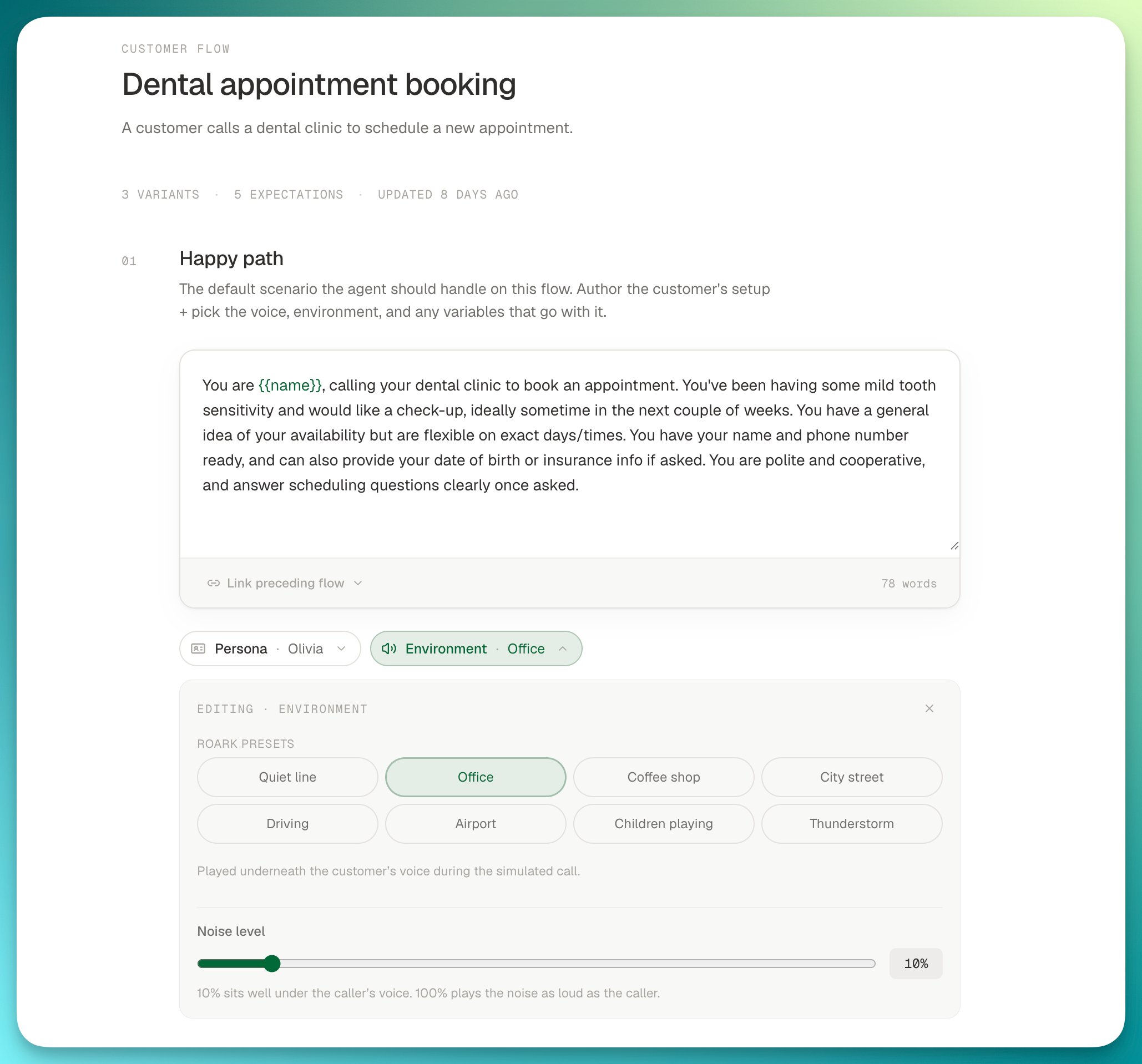
An environment is the acoustic setting a simulated customer calls from: a **noise bed** (an office, a coffee shop, a car) and the **level** it plays at underneath the customer's voice. Every [customer flow](/documentation/simulation-testing/customer-flows) variant runs in exactly one environment, so the same conversation can be tested from a quiet line and from a noisy street without changing anything else.
Environments are a project-level catalogue, shared across flows, the same way [personas](/documentation/simulation-testing/personas) are. They work in both authoring modes:
* In an [Improv flow](/documentation/simulation-testing/customer-flows#improv-mode), the happy path and each edge case carry their own Environment chip.
* In a [Scripted flow](/documentation/simulation-testing/customer-flows#scripted-mode), every path derived from the graph is a variant with the same chip in the right-hand rail, and **Add variant for path** runs the same path again in a different environment.
## Roark presets
Every project sees eight presets, one per noise bed, all playing at the default level:
| Preset | Noise bed |
| ---------------- | ----------------------------------------------- |
| Quiet line | Nothing. The customer calls from a silent room. |
| Office | Open-plan office ambience |
| Coffee shop | Busy café chatter |
| City street | Outdoor city street noise |
| Driving | In-car road and engine noise |
| Airport | Terminal announcements and crowds |
| Children playing | Children in the background at home |
| Thunderstorm | Rain and thunder |
Presets are read-only. You cannot rename, re-level or delete them, and they keep their level on every deploy. Everything else about an environment, you own.
## Noise level
The level is how loud the bed plays relative to the customer's voice. In the flow editor it is a slider from 0% to 100%; over the API it is `backgroundNoiseVolume`, a gain from `0` to `1`.
* **10% is the default** and what every preset plays at. Roark first normalises each noise asset to a fixed loudness, then applies the level, so 10% lands roughly 20 dB under phone speech: clearly audible in the background without competing with the caller.
* **100% plays the noise as loud as the customer.** Use it to find out where your agent's endpointing and transcription break down, not as a realistic call.
* The level is a linear gain, not a perceptual scale. 50% is close to speech level, not half as loud as 100%.
## Setting the environment in the flow editor
Each variant carries a **Persona · Environment · Variables** chip strip: under the customer setup in an Improv flow, and on each path's variant card in the rail of a Scripted flow. The Environment chip opens a panel that lists the Roark presets and, once you have some, **Your environments**.
Click a preset chip. The variant runs in that environment immediately, at the default level.
Drag **Noise level**. As soon as it leaves the preset's own level, the panel offers **Save as your environment** with a name filled in for you, such as "Office (30% noise)". Overwrite the name if you want, then click **Save environment**. Roark creates a project environment with that bed and level and binds the variant to it. The preset itself is untouched.
Your environments appear as chips on every variant in the project. Pick one and the same panel lets you rename it, change its level or delete it. If you drag a preset to a level you have already saved, the panel offers **Use it** instead of creating a duplicate.
 A few rules the editor enforces:
* **Edge cases inherit the happy path's environment** until you pick one for them; the chip reads "Office (inherited)". Choose **Inherit** to go back to inheriting.
* **A change to one of your environments applies everywhere it is picked.** It is a shared row, not a per-variant copy. To give one variant a different level, save a second environment.
* **An environment in use cannot be deleted.** Point the variants that use it at another environment first; the panel tells you how many there are.
* **Runs keep what they were built with.** Roark snapshots the environment when a run is created, so editing or deleting it later never changes a run already in flight or its report.
Two edge cases with the same persona and brief but different environments are a quick way to compare how your agent copes with the same customer in a quiet room and a noisy one. In the **Add edge case** menu, **From an environment** creates one in a single click.
## Config as code
In an [Improv flow defined as YAML](/documentation/config-as-code/flows#improv-type-improv), the happy path and any edge case reference an environment by its display name, exactly as it appears in the panel:
```yaml theme={"theme":{"light":"everforest-light","dark":"everforest-dark"}}
kind: flow
type: improv
name: frustrated-rebooking
agents: [frontdesk]
happyPath:
persona: frustrated-caller
environment: Office (30% noise)
prompt: You call to rebook the cleaning that was cancelled on you.
edgeCases:
- name: from-the-car
environment: Driving
```
The name has to exist in the project before the config is applied. Presets always do; create your own environments in the editor or over the API first.
A [Scripted flow in YAML](/documentation/config-as-code/flows#scripted-type-scripted) describes the graph only. Its variants are derived from the paths when the config is applied and start on the Quiet line preset, so set their environments in the editor afterwards.
## API
Manage environments programmatically to keep them alongside your test suite or to set up a project from a script. Full request and response schemas are in the [API reference](/api-reference/introduction).
* **List environments**: `GET /v1/simulation/environment` returns your environments and the Roark presets
* **Get an environment**: `GET /v1/simulation/environment/{environmentId}`
* **Create an environment**: `POST /v1/simulation/environment`
* **Update an environment**: `PUT /v1/simulation/environment/{environmentId}`
* **Delete an environment**: `DELETE /v1/simulation/environment/{environmentId}`
Create one with a bed and a level. `backgroundNoiseVolume` is optional and defaults to `0.1`:
```bash cURL theme={"theme":{"light":"everforest-light","dark":"everforest-dark"}}
curl -X POST https://api.roark.ai/v1/simulation/environment \
-H "Authorization: Bearer YOUR_API_KEY" \
-H "Content-Type: application/json" \
-d '{
"name": "Busy call centre",
"description": "Open-plan office at peak hours",
"backgroundNoise": "OFFICE",
"backgroundNoiseVolume": 0.3
}'
```
```typescript Node theme={"theme":{"light":"everforest-light","dark":"everforest-dark"}}
import Roark from '@roarkanalytics/sdk'
const client = new Roark({ bearerToken: process.env.ROARK_API_BEARER_TOKEN })
const environment = await client.simulationEnvironment.create({
name: 'Busy call centre',
description: 'Open-plan office at peak hours',
backgroundNoise: 'OFFICE',
backgroundNoiseVolume: 0.3,
})
console.log(environment.data.id)
```
```python Python theme={"theme":{"light":"everforest-light","dark":"everforest-dark"}}
import os
from roark_analytics import Roark
client = Roark(bearer_token=os.environ["ROARK_API_BEARER_TOKEN"])
environment = client.simulation_environment.create(
name="Busy call centre",
description="Open-plan office at peak hours",
background_noise="OFFICE",
background_noise_volume=0.3,
)
print(environment.data.id)
```
The response is the environment you can now reference from a customer flow variant's `environmentId`:
```json theme={"theme":{"light":"everforest-light","dark":"everforest-dark"}}
{
"data": {
"id": "6f1c2b8e-4d21-4f0a-9d3b-2b6c1e9f0a11",
"name": "Busy call centre",
"description": "Open-plan office at peak hours",
"backgroundNoise": "OFFICE",
"backgroundNoiseVolume": 0.3,
"createdAt": "2026-09-08T18:20:11.512Z",
"updatedAt": "2026-09-08T18:20:11.512Z"
}
}
```
Updates change only the fields you send:
```bash theme={"theme":{"light":"everforest-light","dark":"everforest-dark"}}
curl -X PUT https://api.roark.ai/v1/simulation/environment/6f1c2b8e-4d21-4f0a-9d3b-2b6c1e9f0a11 \
-H "Authorization: Bearer YOUR_API_KEY" \
-H "Content-Type: application/json" \
-d '{ "backgroundNoiseVolume": 0.5 }'
```
`backgroundNoise` accepts `NONE`, `OFFICE`, `COFFEE_SHOP`, `CITY`, `DRIVING`, `AIRPORT`, `CHILDREN_PLAYING` or `THUNDERSTORM`.
Errors to handle:
| Status | When |
| ------ | -------------------------------------------------------------------------------------------------- |
| `400` | Invalid body, for example a level outside `0` to `1`, or an update with no fields |
| `403` | The environment is a Roark preset, or the API key lacks the simulation permission |
| `404` | Unknown or already deleted environment id |
| `409` | A delete while a live customer flow variant still uses the environment. Move those variants first. |
Deleting is a soft delete: the environment disappears from lists and cannot be picked for new runs, but runs already built keep their snapshot of it.
A few rules the editor enforces:
* **Edge cases inherit the happy path's environment** until you pick one for them; the chip reads "Office (inherited)". Choose **Inherit** to go back to inheriting.
* **A change to one of your environments applies everywhere it is picked.** It is a shared row, not a per-variant copy. To give one variant a different level, save a second environment.
* **An environment in use cannot be deleted.** Point the variants that use it at another environment first; the panel tells you how many there are.
* **Runs keep what they were built with.** Roark snapshots the environment when a run is created, so editing or deleting it later never changes a run already in flight or its report.
Two edge cases with the same persona and brief but different environments are a quick way to compare how your agent copes with the same customer in a quiet room and a noisy one. In the **Add edge case** menu, **From an environment** creates one in a single click.
## Config as code
In an [Improv flow defined as YAML](/documentation/config-as-code/flows#improv-type-improv), the happy path and any edge case reference an environment by its display name, exactly as it appears in the panel:
```yaml theme={"theme":{"light":"everforest-light","dark":"everforest-dark"}}
kind: flow
type: improv
name: frustrated-rebooking
agents: [frontdesk]
happyPath:
persona: frustrated-caller
environment: Office (30% noise)
prompt: You call to rebook the cleaning that was cancelled on you.
edgeCases:
- name: from-the-car
environment: Driving
```
The name has to exist in the project before the config is applied. Presets always do; create your own environments in the editor or over the API first.
A [Scripted flow in YAML](/documentation/config-as-code/flows#scripted-type-scripted) describes the graph only. Its variants are derived from the paths when the config is applied and start on the Quiet line preset, so set their environments in the editor afterwards.
## API
Manage environments programmatically to keep them alongside your test suite or to set up a project from a script. Full request and response schemas are in the [API reference](/api-reference/introduction).
* **List environments**: `GET /v1/simulation/environment` returns your environments and the Roark presets
* **Get an environment**: `GET /v1/simulation/environment/{environmentId}`
* **Create an environment**: `POST /v1/simulation/environment`
* **Update an environment**: `PUT /v1/simulation/environment/{environmentId}`
* **Delete an environment**: `DELETE /v1/simulation/environment/{environmentId}`
Create one with a bed and a level. `backgroundNoiseVolume` is optional and defaults to `0.1`:
```bash cURL theme={"theme":{"light":"everforest-light","dark":"everforest-dark"}}
curl -X POST https://api.roark.ai/v1/simulation/environment \
-H "Authorization: Bearer YOUR_API_KEY" \
-H "Content-Type: application/json" \
-d '{
"name": "Busy call centre",
"description": "Open-plan office at peak hours",
"backgroundNoise": "OFFICE",
"backgroundNoiseVolume": 0.3
}'
```
```typescript Node theme={"theme":{"light":"everforest-light","dark":"everforest-dark"}}
import Roark from '@roarkanalytics/sdk'
const client = new Roark({ bearerToken: process.env.ROARK_API_BEARER_TOKEN })
const environment = await client.simulationEnvironment.create({
name: 'Busy call centre',
description: 'Open-plan office at peak hours',
backgroundNoise: 'OFFICE',
backgroundNoiseVolume: 0.3,
})
console.log(environment.data.id)
```
```python Python theme={"theme":{"light":"everforest-light","dark":"everforest-dark"}}
import os
from roark_analytics import Roark
client = Roark(bearer_token=os.environ["ROARK_API_BEARER_TOKEN"])
environment = client.simulation_environment.create(
name="Busy call centre",
description="Open-plan office at peak hours",
background_noise="OFFICE",
background_noise_volume=0.3,
)
print(environment.data.id)
```
The response is the environment you can now reference from a customer flow variant's `environmentId`:
```json theme={"theme":{"light":"everforest-light","dark":"everforest-dark"}}
{
"data": {
"id": "6f1c2b8e-4d21-4f0a-9d3b-2b6c1e9f0a11",
"name": "Busy call centre",
"description": "Open-plan office at peak hours",
"backgroundNoise": "OFFICE",
"backgroundNoiseVolume": 0.3,
"createdAt": "2026-09-08T18:20:11.512Z",
"updatedAt": "2026-09-08T18:20:11.512Z"
}
}
```
Updates change only the fields you send:
```bash theme={"theme":{"light":"everforest-light","dark":"everforest-dark"}}
curl -X PUT https://api.roark.ai/v1/simulation/environment/6f1c2b8e-4d21-4f0a-9d3b-2b6c1e9f0a11 \
-H "Authorization: Bearer YOUR_API_KEY" \
-H "Content-Type: application/json" \
-d '{ "backgroundNoiseVolume": 0.5 }'
```
`backgroundNoise` accepts `NONE`, `OFFICE`, `COFFEE_SHOP`, `CITY`, `DRIVING`, `AIRPORT`, `CHILDREN_PLAYING` or `THUNDERSTORM`.
Errors to handle:
| Status | When |
| ------ | -------------------------------------------------------------------------------------------------- |
| `400` | Invalid body, for example a level outside `0` to `1`, or an update with no fields |
| `403` | The environment is a Roark preset, or the API key lacks the simulation permission |
| `404` | Unknown or already deleted environment id |
| `409` | A delete while a live customer flow variant still uses the environment. Move those variants first. |
Deleting is a soft delete: the environment disappears from lists and cannot be picked for new runs, but runs already built keep their snapshot of it.