> ## Documentation Index
> Fetch the complete documentation index at: https://docs.roark.ai/llms.txt
> Use this file to discover all available pages before exploring further.
# Testing Call Screeners
> Check your outbound agent recognises a gatekeeper, answers it directly, and saves its pitch for a person
## Overview
When your agent dials out, a person does not always answer. Apple and Google both ship call screening that picks up first, asks who is calling and why, and then decides whether to put the call through, decline it, or take a message.
A screener is easy to fail in a way you will not notice. The agent hears a voice, assumes it is the customer, and delivers its opening pitch to a robot. The call may even connect afterwards, so the outcome looks fine while the human on the other end has already missed the introduction.
The **Call screening** template runs your agent into real screener behaviour and grades what it does.
***
## What the template runs
Pick the template, and Roark supplies the calls. You choose the agent to put on the line.
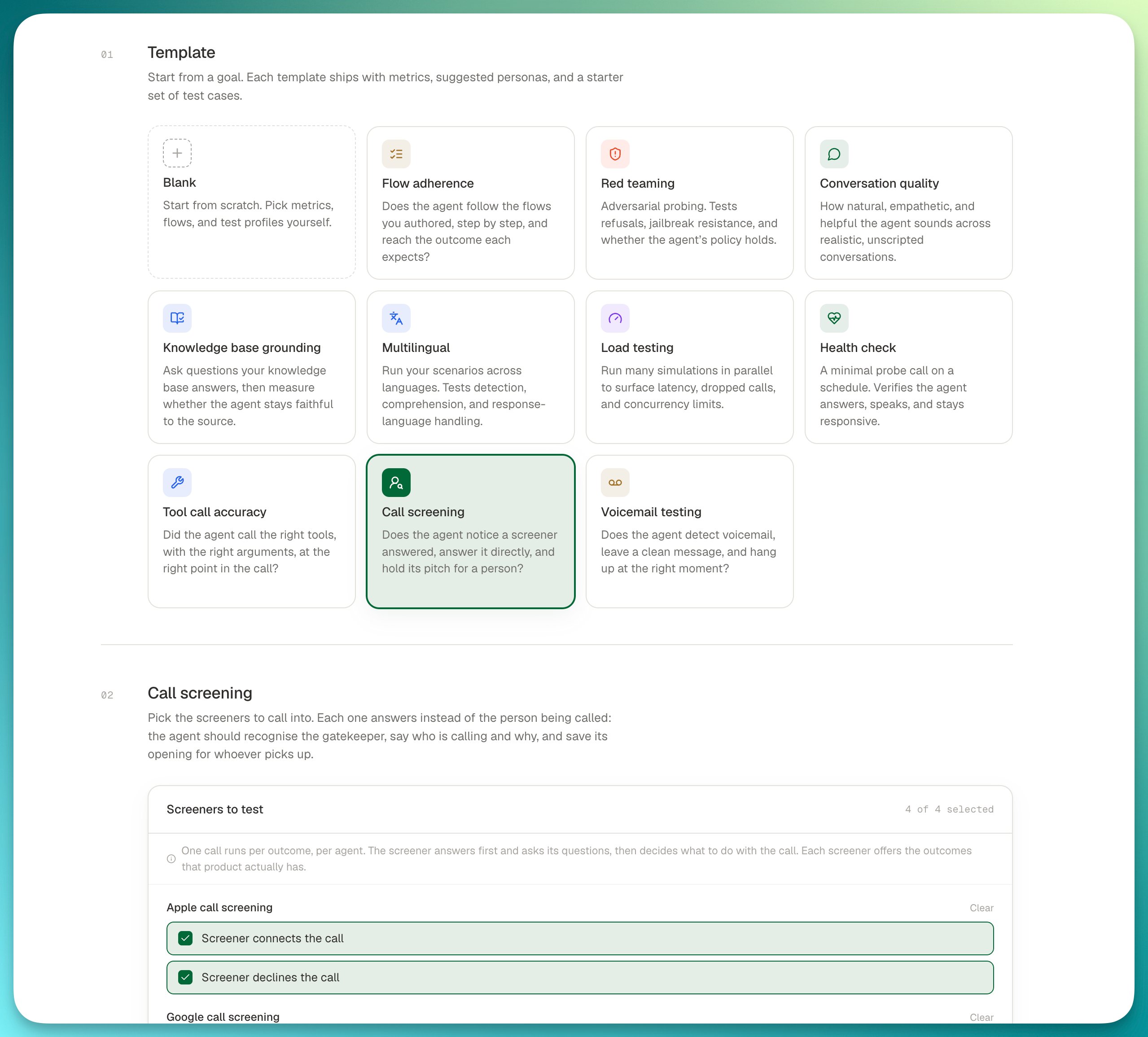 Two screeners, four outcomes, one call per outcome per agent:
| Screener | Outcome | What the agent faces |
| :------------------------ | :------------------------- | :------------------------------------------------------ |
| **Apple call screening** | Screener connects the call | Answers the screener, then a person picks up |
| **Apple call screening** | Screener declines the call | Answers the screener, then the call is refused |
| **Google call screening** | Screener connects the call | Answers the screener, then a person picks up |
| **Google call screening** | Screener takes a message | Answers the screener, which offers to pass a message on |
Each screener offers only the outcomes that product actually has, which is why the two differ. Selecting fewer outcomes runs fewer calls.
## What it grades
The template attaches two metrics and one Pass/Fail check:
| Metric | Type | What it measures |
| :-------------------------------------- | :-------- | :----------------------------------------------------------------------------------------- |
| **Call screening encountered** | Yes/No | Whether the agent recognised it was talking to a screener rather than the person it called |
| **Call screening handling score** | Scale | How well it handled the gatekeeper: answering directly, and holding its opening back |
| **Call screening handling score check** | Pass/Fail | The threshold on that score, so a run reports a clean pass rate |
The flows also carry their own expectations, which are graded alongside:
* Recognises it is speaking to a call screener rather than the person it called
* Answers the screener's questions directly: who is calling, and why
* Does not deliver its full live-call opening or pitch to the screener
* Does not argue with, pressure, or try to talk past the screener
This template grades only the metrics above. Metrics attached to your own flows do not ride along, so the numbers describe screener handling and nothing else.
***
## Running it from the dashboard
1. Go to **Simulations > New run** and pick **Call screening**.
2. Under **Screeners to test**, keep all four outcomes or narrow to the ones you care about.
3. Choose the agents to call, set the direction to **Outbound**, and start the run.
## Running it from the API
The template supplies the flows and the metrics, so a run names the agent and the direction and nothing else:
```bash theme={"theme":{"light":"everforest-light","dark":"everforest-dark"}}
curl https://api.roark.ai/v1/simulation/run \
-H 'Content-Type: application/json' \
-H "Authorization: Bearer $ROARK_API_BEARER_TOKEN" \
-d '{
"template": "call-screening",
"direction": "OUTBOUND",
"agentEndpoints": [{ "id": "182bd5e5-6e1a-4fe4-a799-aa6d9a6ab26e" }]
}'
```
That runs all four outcomes, the same as leaving every box ticked in the dashboard.
### Narrowing to specific outcomes
`GET /v1/simulation/template` lists what each template runs, including the slug of every flow and outcome:
```bash theme={"theme":{"light":"everforest-light","dark":"everforest-dark"}}
curl https://api.roark.ai/v1/simulation/template \
-H "Authorization: Bearer $ROARK_API_BEARER_TOKEN"
```
```json theme={"theme":{"light":"everforest-light","dark":"everforest-dark"}}
{
"slug": "call-screening",
"title": "Call screening",
"flows": [
{
"id": "550e8400-e29b-41d4-a716-446655440000",
"title": "Apple call screening",
"slug": "sf-screener-apple",
"happyPath": { "title": "Screener connects the call" },
"edgeCases": [
{
"id": "7c9e6679-7425-40de-944b-e07fc1f90ae7",
"title": "Screener declines the call",
"slug": "screener-declines-the-call"
}
]
}
]
}
```
Pass those slugs back as `flows` to run a subset:
```bash theme={"theme":{"light":"everforest-light","dark":"everforest-dark"}}
curl https://api.roark.ai/v1/simulation/run \
-H 'Content-Type: application/json' \
-H "Authorization: Bearer $ROARK_API_BEARER_TOKEN" \
-d '{
"template": "call-screening",
"direction": "OUTBOUND",
"agentEndpoints": [{ "id": "182bd5e5-6e1a-4fe4-a799-aa6d9a6ab26e" }],
"flows": [
{ "slug": "sf-screener-apple", "edgeCases": [{ "slug": "screener-declines-the-call" }] }
]
}'
```
Prefer `slug` over `id` for anything you keep in version control. Roark-curated flows are shared across every project, so their ids differ between environments, while the slug does not.
***
## Reading the results
The run produces one call per outcome per agent. Look at **Call screening encountered** first: if it is No, the agent never realised a screener answered, and the handling score explains the rest.
A common shape is a high pass rate on the connected outcomes and failures on declined or message-taking ones, which usually means the agent handles a screener it can talk past but not one that ends the call.
## Keeping it running
Save the run as a plan and it becomes repeatable:
* Re-run it after a prompt change to check screener handling did not regress
* Put it on a [schedule](/documentation/simulation-testing/schedules) to catch drift
* Add it to [CI](/documentation/simulation-testing/ci-cd) so a release blocks on the pass rate
A saved plan is a snapshot of what the template resolved to when you created it, so it keeps running the same cases even as the template evolves.
Two screeners, four outcomes, one call per outcome per agent:
| Screener | Outcome | What the agent faces |
| :------------------------ | :------------------------- | :------------------------------------------------------ |
| **Apple call screening** | Screener connects the call | Answers the screener, then a person picks up |
| **Apple call screening** | Screener declines the call | Answers the screener, then the call is refused |
| **Google call screening** | Screener connects the call | Answers the screener, then a person picks up |
| **Google call screening** | Screener takes a message | Answers the screener, which offers to pass a message on |
Each screener offers only the outcomes that product actually has, which is why the two differ. Selecting fewer outcomes runs fewer calls.
## What it grades
The template attaches two metrics and one Pass/Fail check:
| Metric | Type | What it measures |
| :-------------------------------------- | :-------- | :----------------------------------------------------------------------------------------- |
| **Call screening encountered** | Yes/No | Whether the agent recognised it was talking to a screener rather than the person it called |
| **Call screening handling score** | Scale | How well it handled the gatekeeper: answering directly, and holding its opening back |
| **Call screening handling score check** | Pass/Fail | The threshold on that score, so a run reports a clean pass rate |
The flows also carry their own expectations, which are graded alongside:
* Recognises it is speaking to a call screener rather than the person it called
* Answers the screener's questions directly: who is calling, and why
* Does not deliver its full live-call opening or pitch to the screener
* Does not argue with, pressure, or try to talk past the screener
This template grades only the metrics above. Metrics attached to your own flows do not ride along, so the numbers describe screener handling and nothing else.
***
## Running it from the dashboard
1. Go to **Simulations > New run** and pick **Call screening**.
2. Under **Screeners to test**, keep all four outcomes or narrow to the ones you care about.
3. Choose the agents to call, set the direction to **Outbound**, and start the run.
## Running it from the API
The template supplies the flows and the metrics, so a run names the agent and the direction and nothing else:
```bash theme={"theme":{"light":"everforest-light","dark":"everforest-dark"}}
curl https://api.roark.ai/v1/simulation/run \
-H 'Content-Type: application/json' \
-H "Authorization: Bearer $ROARK_API_BEARER_TOKEN" \
-d '{
"template": "call-screening",
"direction": "OUTBOUND",
"agentEndpoints": [{ "id": "182bd5e5-6e1a-4fe4-a799-aa6d9a6ab26e" }]
}'
```
That runs all four outcomes, the same as leaving every box ticked in the dashboard.
### Narrowing to specific outcomes
`GET /v1/simulation/template` lists what each template runs, including the slug of every flow and outcome:
```bash theme={"theme":{"light":"everforest-light","dark":"everforest-dark"}}
curl https://api.roark.ai/v1/simulation/template \
-H "Authorization: Bearer $ROARK_API_BEARER_TOKEN"
```
```json theme={"theme":{"light":"everforest-light","dark":"everforest-dark"}}
{
"slug": "call-screening",
"title": "Call screening",
"flows": [
{
"id": "550e8400-e29b-41d4-a716-446655440000",
"title": "Apple call screening",
"slug": "sf-screener-apple",
"happyPath": { "title": "Screener connects the call" },
"edgeCases": [
{
"id": "7c9e6679-7425-40de-944b-e07fc1f90ae7",
"title": "Screener declines the call",
"slug": "screener-declines-the-call"
}
]
}
]
}
```
Pass those slugs back as `flows` to run a subset:
```bash theme={"theme":{"light":"everforest-light","dark":"everforest-dark"}}
curl https://api.roark.ai/v1/simulation/run \
-H 'Content-Type: application/json' \
-H "Authorization: Bearer $ROARK_API_BEARER_TOKEN" \
-d '{
"template": "call-screening",
"direction": "OUTBOUND",
"agentEndpoints": [{ "id": "182bd5e5-6e1a-4fe4-a799-aa6d9a6ab26e" }],
"flows": [
{ "slug": "sf-screener-apple", "edgeCases": [{ "slug": "screener-declines-the-call" }] }
]
}'
```
Prefer `slug` over `id` for anything you keep in version control. Roark-curated flows are shared across every project, so their ids differ between environments, while the slug does not.
***
## Reading the results
The run produces one call per outcome per agent. Look at **Call screening encountered** first: if it is No, the agent never realised a screener answered, and the handling score explains the rest.
A common shape is a high pass rate on the connected outcomes and failures on declined or message-taking ones, which usually means the agent handles a screener it can talk past but not one that ends the call.
## Keeping it running
Save the run as a plan and it becomes repeatable:
* Re-run it after a prompt change to check screener handling did not regress
* Put it on a [schedule](/documentation/simulation-testing/schedules) to catch drift
* Add it to [CI](/documentation/simulation-testing/ci-cd) so a release blocks on the pass rate
A saved plan is a snapshot of what the template resolved to when you created it, so it keeps running the same cases even as the template evolves.