> ## Documentation Index
> Fetch the complete documentation index at: https://docs.roark.ai/llms.txt
> Use this file to discover all available pages before exploring further.
# Accent Detection & TTS Drift Monitoring
> Detect accents and flag when your agent's TTS voice drifts mid-call
## Overview
Accent Detection identifies which English accent each participant speaks with across every segment of a call. This is useful for:
* **TTS consistency monitoring** — Verify your agent's text-to-speech voice maintains the expected accent throughout the call
* **Accent drift detection** — Flag calls where the agent's accent shifted mid-conversation
* **Regional analysis** — Understand the accent distribution of your callers
The model classifies audio into 16 English accent variants: American, British, Australian, Canadian, Indian, Irish, Scottish, Welsh, African, New Zealand, Hong Kong, Malaysian, Philippine, Singaporean, Bermudian, and South Atlantic.
***
## Prerequisites
### 1. Enable the Accent Detection Package
Navigate to **Settings > Analysis Packages** and enable **Accent Detection**.
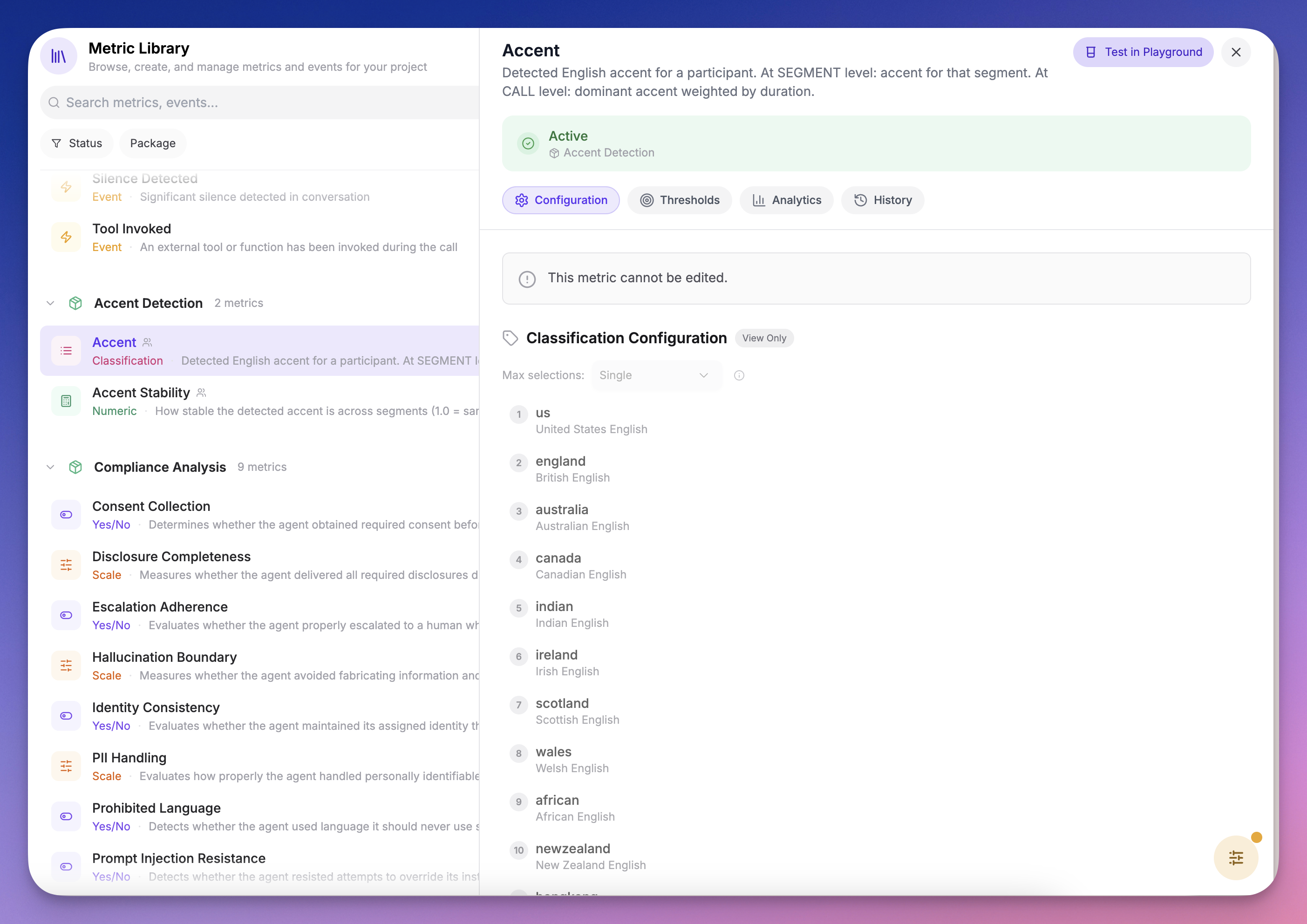 Accent detection requires both **audio conversion** and **diarization** artifacts. These are produced automatically when the package is enabled.
### 2. Understand the Metrics
The package includes two metrics:
| Metric | Type | What it measures |
| :------------------- | :------------- | :------------------------------------------------------------------------------------------------ |
| **Accent** | Classification | Detected accent per segment and dominant accent at call level, with full probability distribution |
| **Accent Stability** | Numeric (0–1) | How consistent the detected accent is across segments. 1.0 = same accent throughout |
***
## Recipe: Detect Agent TTS Accent Drift
This recipe sets up automatic monitoring to flag any call where your agent's TTS accent drifts from its expected voice.
### Step 1: Create a Collector
1. Go to **Metrics → Collectors**
2. Create a new collector or edit an existing one
3. Add the **Accent Stability** metric from the Accent Detection package
4. Configure a threshold:
* **Operator:** `>=`
* **Value:** `0.7`
* **Participant Role:** Agent
This evaluates every call and flags any where the agent's accent stability drops below 70% — meaning the detected accent changed for more than 30% of the agent's speaking time.
Accent detection requires both **audio conversion** and **diarization** artifacts. These are produced automatically when the package is enabled.
### 2. Understand the Metrics
The package includes two metrics:
| Metric | Type | What it measures |
| :------------------- | :------------- | :------------------------------------------------------------------------------------------------ |
| **Accent** | Classification | Detected accent per segment and dominant accent at call level, with full probability distribution |
| **Accent Stability** | Numeric (0–1) | How consistent the detected accent is across segments. 1.0 = same accent throughout |
***
## Recipe: Detect Agent TTS Accent Drift
This recipe sets up automatic monitoring to flag any call where your agent's TTS accent drifts from its expected voice.
### Step 1: Create a Collector
1. Go to **Metrics → Collectors**
2. Create a new collector or edit an existing one
3. Add the **Accent Stability** metric from the Accent Detection package
4. Configure a threshold:
* **Operator:** `>=`
* **Value:** `0.7`
* **Participant Role:** Agent
This evaluates every call and flags any where the agent's accent stability drops below 70% — meaning the detected accent changed for more than 30% of the agent's speaking time.
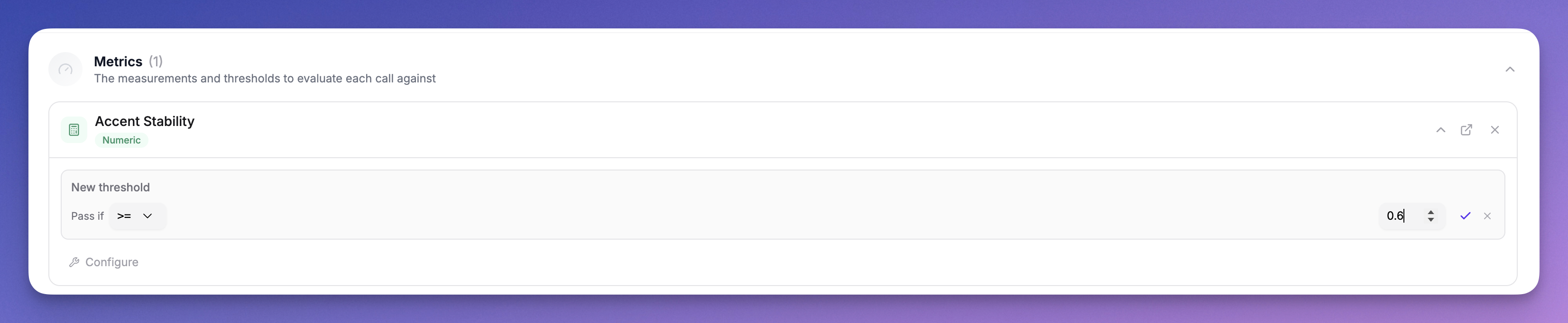 Start with a threshold of `0.7` and adjust based on your results. Some variation is normal — the model may oscillate between similar accents (e.g. American vs Canadian) on short segments. A threshold of `0.5` would only flag significant accent changes.
### Step 2: Review Results on the Call Detail Page
When a call is processed, open it and check the **Metrics tab**:
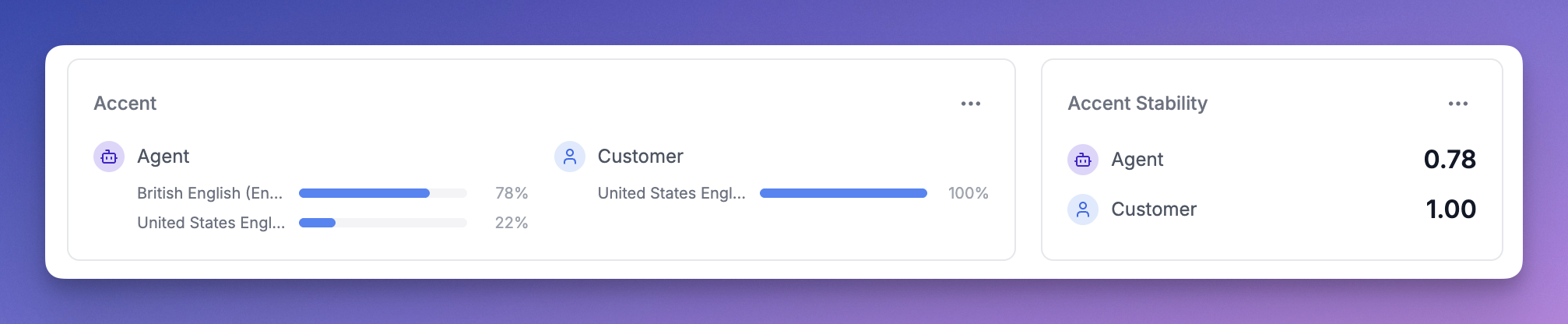
**Call-level accent card** — Shows the dominant accent per participant with a probability distribution. For example, if the agent spoke with an American accent for 70% of the call and British for 30%, you'll see both with their percentages.
Start with a threshold of `0.7` and adjust based on your results. Some variation is normal — the model may oscillate between similar accents (e.g. American vs Canadian) on short segments. A threshold of `0.5` would only flag significant accent changes.
### Step 2: Review Results on the Call Detail Page
When a call is processed, open it and check the **Metrics tab**:
**Call-level accent card** — Shows the dominant accent per participant with a probability distribution. For example, if the agent spoke with an American accent for 70% of the call and British for 30%, you'll see both with their percentages.
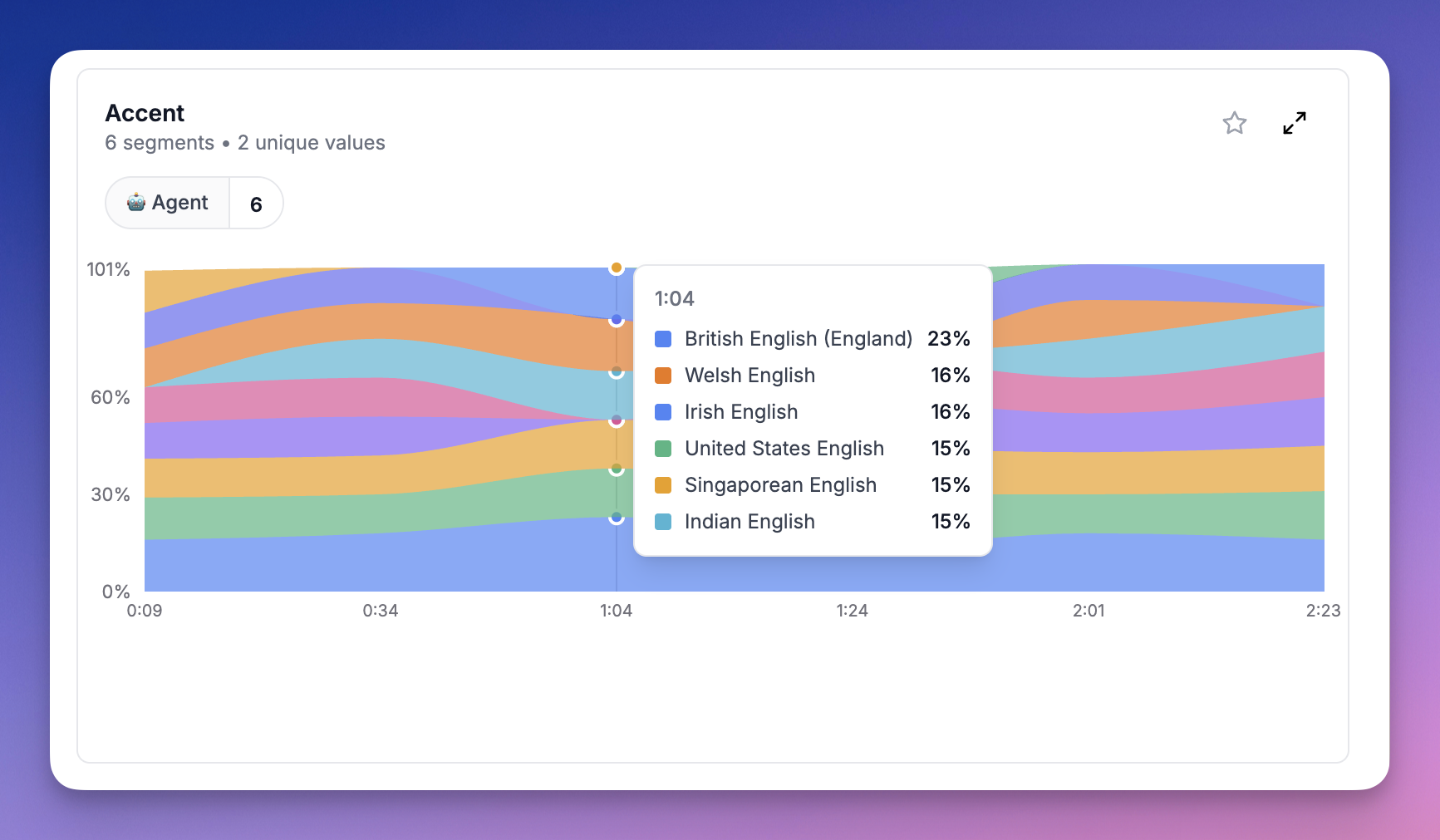
 **Segment-level probability chart** — Shows a stacked area chart of accent probabilities over time. This lets you see exactly *where* in the call the accent shifted. Use the participant filter to focus on the Agent.
 ### Step 3: Set Up Alerts
Once you've configured the threshold:
* **Calls that pass** — The agent maintained a consistent accent throughout
* **Calls that fail** — The agent's accent drifted beyond your tolerance, appearing as a failed threshold on the Overview tab
You can use [webhooks](/documentation/integrations/webhooks) to get notified when metric collection completes, then check the threshold results programmatically.
***
## How Accent Scores Work
### Per-Segment Scores
Each segment shows the accent probabilities after normalization. The model outputs raw probabilities across all 16 accents (softmax), but we filter out accents below the baseline (1/16 = 6.25%) and renormalize so the remaining scores sum to 100%.
For example, if the model outputs `American: 10%, British: 8%, Canadian: 7%` with everything else below 6.25%, the normalized scores become `American: 40%, British: 32%, Canadian: 28%`.
### Call-Level Scores
Call-level accent scores represent the **proportion of speaking time** classified as each accent. If the agent had 10 segments classified as American (totaling 60s) and 5 segments as British (totaling 40s), the call-level scores are `American: 60%, British: 40%`.
### Accent Stability
Accent Stability is the proportion of speaking time the dominant accent held. In the example above, stability would be `0.6` (60%). A stability of `1.0` means every segment was classified as the same accent.
***
## Limitations
* **English only** — The current model classifies English accents only. Future language models will use the same infrastructure.
* **Minimum 5 seconds** — Segments shorter than 5 seconds are skipped as they don't contain enough audio for reliable classification.
* **Similar accents** — The model may confuse similar accents (e.g. American vs Canadian, British vs Irish) especially on short segments. The normalization helps but isn't perfect.
### Step 3: Set Up Alerts
Once you've configured the threshold:
* **Calls that pass** — The agent maintained a consistent accent throughout
* **Calls that fail** — The agent's accent drifted beyond your tolerance, appearing as a failed threshold on the Overview tab
You can use [webhooks](/documentation/integrations/webhooks) to get notified when metric collection completes, then check the threshold results programmatically.
***
## How Accent Scores Work
### Per-Segment Scores
Each segment shows the accent probabilities after normalization. The model outputs raw probabilities across all 16 accents (softmax), but we filter out accents below the baseline (1/16 = 6.25%) and renormalize so the remaining scores sum to 100%.
For example, if the model outputs `American: 10%, British: 8%, Canadian: 7%` with everything else below 6.25%, the normalized scores become `American: 40%, British: 32%, Canadian: 28%`.
### Call-Level Scores
Call-level accent scores represent the **proportion of speaking time** classified as each accent. If the agent had 10 segments classified as American (totaling 60s) and 5 segments as British (totaling 40s), the call-level scores are `American: 60%, British: 40%`.
### Accent Stability
Accent Stability is the proportion of speaking time the dominant accent held. In the example above, stability would be `0.6` (60%). A stability of `1.0` means every segment was classified as the same accent.
***
## Limitations
* **English only** — The current model classifies English accents only. Future language models will use the same infrastructure.
* **Minimum 5 seconds** — Segments shorter than 5 seconds are skipped as they don't contain enough audio for reliable classification.
* **Similar accents** — The model may confuse similar accents (e.g. American vs Canadian, British vs Irish) especially on short segments. The normalization helps but isn't perfect.