> ## Documentation Index
> Fetch the complete documentation index at: https://docs.roark.ai/llms.txt
> Use this file to discover all available pages before exploring further.
# Live Monitoring
> Browse, search, and analyze every voice AI call
## Overview
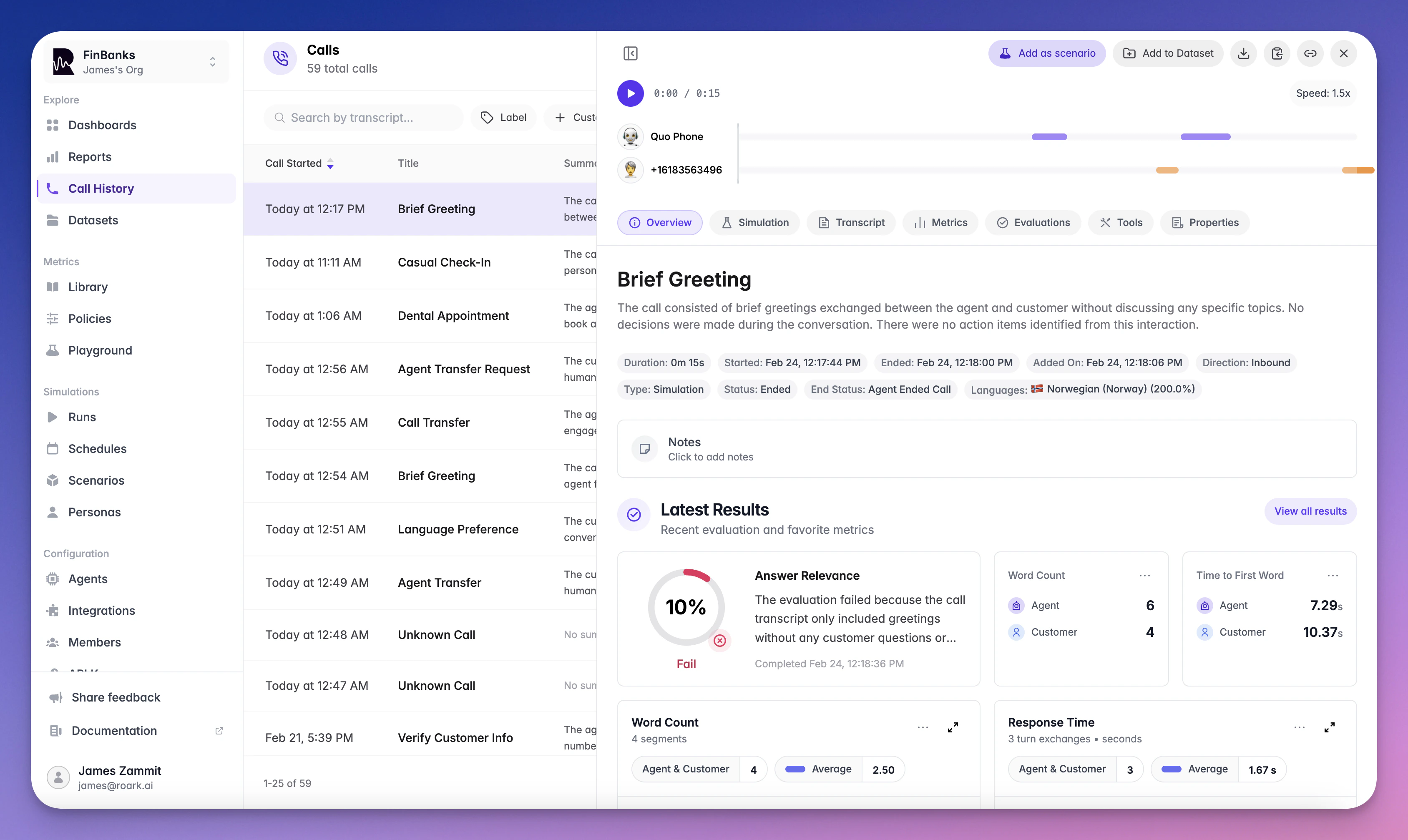
Call History is your central hub for browsing, searching, and analyzing every call that flows through Roark. Each call is automatically transcribed and analyzed the moment it arrives.
 ***
## Getting Calls Into Roark
### Via Integration
Connect a voice platform — [Vapi](/documentation/integrations/vapi), [Retell](/documentation/integrations/retell), [LiveKit](/documentation/integrations/livekit), or [Pipecat](/documentation/integrations/pipecat) — and calls sync automatically. See [Integrations](/documentation/integrations/overview) for setup guides.
### Via API
Upload a call recording using the [Node.js](/documentation/sdks/node-sdk) or [Python](/documentation/sdks/python-sdk) SDK:
```typescript theme={"theme":{"light":"everforest-light","dark":"everforest-dark"}}
const call = await client.call.create({
recordingUrl: 'https://example.com/recording.mp3',
startedAt: '2024-01-15T10:00:00Z',
interfaceType: 'PHONE',
callDirection: 'INBOUND',
agent: { name: 'Support Agent' },
customer: { phoneNumberE164: '+15551234567' },
properties: { department: 'sales' },
})
```
Once created, the call appears in Call History and is automatically analyzed.
***
## What You See Per Call
Each call opens into a detailed view with the following tabs:
* **Overview** — AI-generated summary, key stats (duration, direction, status, end status), participants, and labels
* **Transcript** — Speaker-diarized conversation with timestamps, tool call annotations, and sentiment overlay
* **Metrics** — All collected metric values organized by package (call-level, segment-level, turn-level)
* **Properties** — Custom metadata passed with the call, filterable and searchable
* **Tools** — All tool/function invocations with inputs, outputs, and error details
You can turn real calls into [customer flows](/documentation/simulation-testing/customer-flows) — when creating a flow, choose **From your calls** and Roark drafts the flow from the conversations you pick.
***
## Filtering and Search
Find exactly what you need:
* **Full-text transcript search** across all calls
* **Filters** — duration, end status, call type (live vs simulation), agent, labels, analysis status, and custom properties
* **Saved views** for quick access to frequently used filter combinations
***
## Deep Linking with URL Parameters
Share filtered views or link directly to relevant calls from external systems using URL query parameters. Custom properties can be filtered using dot notation:
```
/org/{org-slug}/{project-slug}/calls?props.{property_name}={operator}{value}
```
### Supported Operators
| Operator | Description | Example |
| -------------- | --------------------- | ----------------------------------- |
| `=` | Equals (default) | `props.status=completed` |
| `!=` | Not equals | `props.status=!=failed` |
| `>` | Greater than | `props.count=>10` |
| `>=` | Greater than or equal | `props.count=>=10` |
| `<` | Less than | `props.count=<5` |
| `<=` | Less than or equal | `props.count=<=5` |
| `contains:` | Contains | `props.customer_name=contains:John` |
| `starts_with:` | Starts with | `props.region=starts_with:us-` |
### Examples
```bash theme={"theme":{"light":"everforest-light","dark":"everforest-dark"}}
# Filter by exact match
/calls?props.simulation_run_id=abc-123
# Filter by contains
/calls?props.customer_name=contains:John
# Filter by not equals
/calls?props.status=!=failed
# Filter by numeric comparison
/calls?props.attempt_count=>3
# Combine multiple filters
/calls?props.simulation_run_id=abc-123&props.region=starts_with:us-
```
### Direct Call Linking
When a filter returns only a single matching call, Roark automatically opens that call's detail view. This enables direct deep linking to specific calls using unique identifiers:
```bash theme={"theme":{"light":"everforest-light","dark":"everforest-dark"}}
# Link directly to a specific call using a unique custom property
/calls?props.custom_call_id=abc-123
```
This is particularly useful when you store your own call identifiers and want to link from external systems directly to the call details without an intermediate list view.
### Use Cases
* **Direct call access** — Link to a specific call using a unique identifier (e.g., `custom_call_id`); the call opens automatically when only one match is found
* **External system integration** — Link from CRMs, dashboards, or internal tools directly to relevant calls
* **Bookmarks** — Save filtered views for quick access to specific call subsets
* **Team sharing** — Share pre-filtered views with teammates for collaboration
***
## Collecting More Metrics
Roark automatically analyzes transcription, speech patterns, and sentiment for every call. To collect additional metrics — like custom LLM evaluations, compliance checks, or business KPIs — configure [metric collectors](/documentation/metrics/metric-collectors) or test metrics in [Studio](/documentation/metrics/studio).
Available out-of-the-box analysis includes:
* Sentiment tracking and 64+ emotion detection
* Interruption and overlap detection
* Speech pause and silence analysis
* Vocal cue detection (raised voice, frustration, etc.)
* Repetition detection
***
## What's Next
Define custom metrics for your calls
Automate metric collection
Build analytics from call data
Organize reports into views
***
## Getting Calls Into Roark
### Via Integration
Connect a voice platform — [Vapi](/documentation/integrations/vapi), [Retell](/documentation/integrations/retell), [LiveKit](/documentation/integrations/livekit), or [Pipecat](/documentation/integrations/pipecat) — and calls sync automatically. See [Integrations](/documentation/integrations/overview) for setup guides.
### Via API
Upload a call recording using the [Node.js](/documentation/sdks/node-sdk) or [Python](/documentation/sdks/python-sdk) SDK:
```typescript theme={"theme":{"light":"everforest-light","dark":"everforest-dark"}}
const call = await client.call.create({
recordingUrl: 'https://example.com/recording.mp3',
startedAt: '2024-01-15T10:00:00Z',
interfaceType: 'PHONE',
callDirection: 'INBOUND',
agent: { name: 'Support Agent' },
customer: { phoneNumberE164: '+15551234567' },
properties: { department: 'sales' },
})
```
Once created, the call appears in Call History and is automatically analyzed.
***
## What You See Per Call
Each call opens into a detailed view with the following tabs:
* **Overview** — AI-generated summary, key stats (duration, direction, status, end status), participants, and labels
* **Transcript** — Speaker-diarized conversation with timestamps, tool call annotations, and sentiment overlay
* **Metrics** — All collected metric values organized by package (call-level, segment-level, turn-level)
* **Properties** — Custom metadata passed with the call, filterable and searchable
* **Tools** — All tool/function invocations with inputs, outputs, and error details
You can turn real calls into [customer flows](/documentation/simulation-testing/customer-flows) — when creating a flow, choose **From your calls** and Roark drafts the flow from the conversations you pick.
***
## Filtering and Search
Find exactly what you need:
* **Full-text transcript search** across all calls
* **Filters** — duration, end status, call type (live vs simulation), agent, labels, analysis status, and custom properties
* **Saved views** for quick access to frequently used filter combinations
***
## Deep Linking with URL Parameters
Share filtered views or link directly to relevant calls from external systems using URL query parameters. Custom properties can be filtered using dot notation:
```
/org/{org-slug}/{project-slug}/calls?props.{property_name}={operator}{value}
```
### Supported Operators
| Operator | Description | Example |
| -------------- | --------------------- | ----------------------------------- |
| `=` | Equals (default) | `props.status=completed` |
| `!=` | Not equals | `props.status=!=failed` |
| `>` | Greater than | `props.count=>10` |
| `>=` | Greater than or equal | `props.count=>=10` |
| `<` | Less than | `props.count=<5` |
| `<=` | Less than or equal | `props.count=<=5` |
| `contains:` | Contains | `props.customer_name=contains:John` |
| `starts_with:` | Starts with | `props.region=starts_with:us-` |
### Examples
```bash theme={"theme":{"light":"everforest-light","dark":"everforest-dark"}}
# Filter by exact match
/calls?props.simulation_run_id=abc-123
# Filter by contains
/calls?props.customer_name=contains:John
# Filter by not equals
/calls?props.status=!=failed
# Filter by numeric comparison
/calls?props.attempt_count=>3
# Combine multiple filters
/calls?props.simulation_run_id=abc-123&props.region=starts_with:us-
```
### Direct Call Linking
When a filter returns only a single matching call, Roark automatically opens that call's detail view. This enables direct deep linking to specific calls using unique identifiers:
```bash theme={"theme":{"light":"everforest-light","dark":"everforest-dark"}}
# Link directly to a specific call using a unique custom property
/calls?props.custom_call_id=abc-123
```
This is particularly useful when you store your own call identifiers and want to link from external systems directly to the call details without an intermediate list view.
### Use Cases
* **Direct call access** — Link to a specific call using a unique identifier (e.g., `custom_call_id`); the call opens automatically when only one match is found
* **External system integration** — Link from CRMs, dashboards, or internal tools directly to relevant calls
* **Bookmarks** — Save filtered views for quick access to specific call subsets
* **Team sharing** — Share pre-filtered views with teammates for collaboration
***
## Collecting More Metrics
Roark automatically analyzes transcription, speech patterns, and sentiment for every call. To collect additional metrics — like custom LLM evaluations, compliance checks, or business KPIs — configure [metric collectors](/documentation/metrics/metric-collectors) or test metrics in [Studio](/documentation/metrics/studio).
Available out-of-the-box analysis includes:
* Sentiment tracking and 64+ emotion detection
* Interruption and overlap detection
* Speech pause and silence analysis
* Vocal cue detection (raised voice, frustration, etc.)
* Repetition detection
***
## What's Next
Define custom metrics for your calls
Automate metric collection
Build analytics from call data
Organize reports into views