> ## Documentation Index
> Fetch the complete documentation index at: https://docs.roark.ai/llms.txt
> Use this file to discover all available pages before exploring further.
# Custom Metrics
> Create and manage custom metrics using LLM prompts, patterns, and formulas
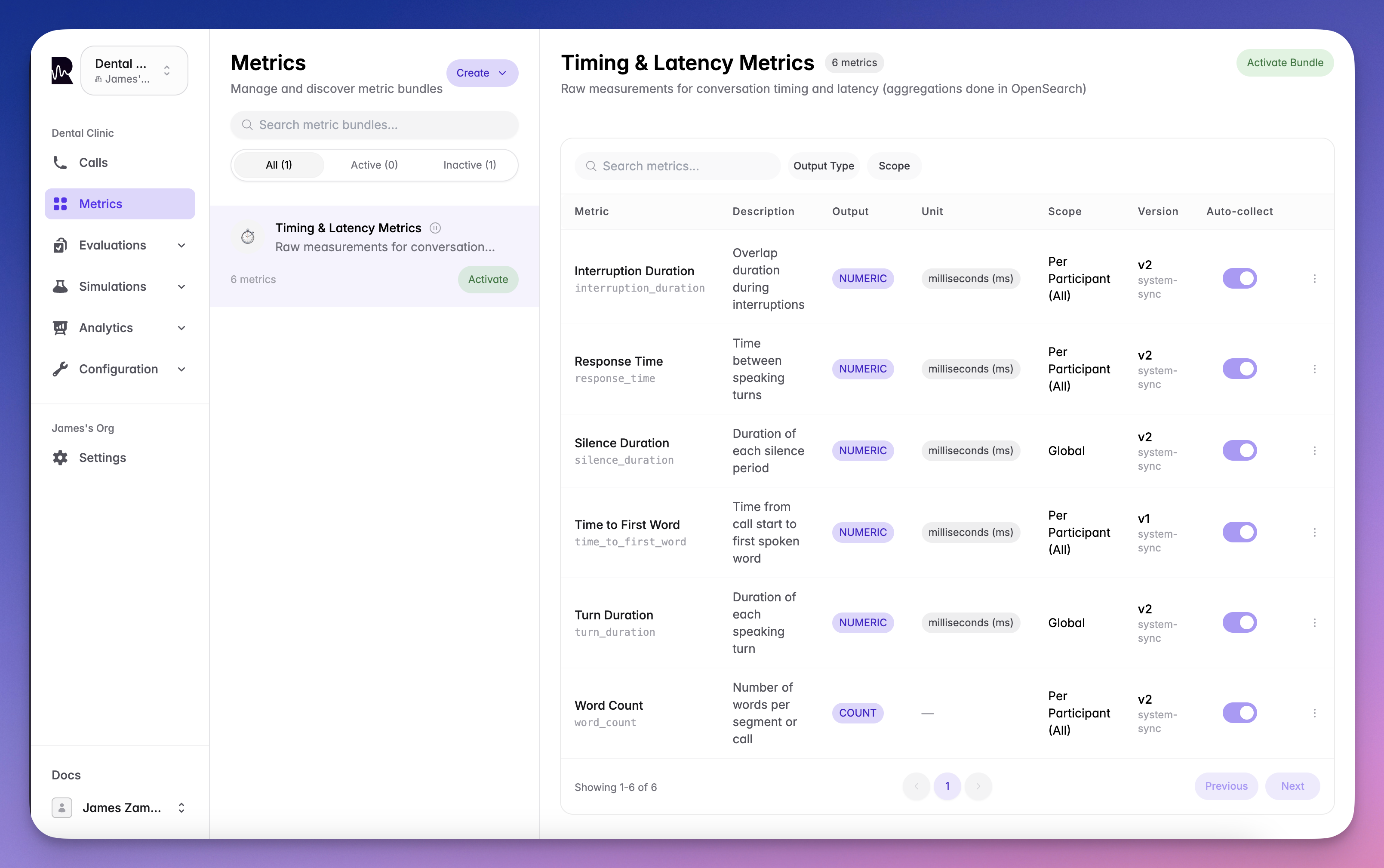
Metric definitions describe what to measure and how. Roark comes with [built-in system metrics](/documentation/metrics/system-metrics) that work out of the box, and you can create your own custom metrics tailored to your business needs.
 ***
## Creating Custom Metrics
Custom metrics let you measure anything specific to your use case — task completion, compliance checks, quality scoring, or business KPIs.
### Custom Metric Types
Write a natural-language prompt describing what to measure. **Roark Prism** — our evaluation model optimized for voice AI — scores each call against your prompt and returns a typed result.
```
"Did the agent verify the caller's identity?" → Boolean
"Rate the agent's empathy on a 1-5 scale" → Scale
"What was the primary reason for the call?" → Classification
"How many times did the agent attempt to upsell?" → Count
```
Best for subjective assessments, business logic, and anything that requires understanding conversational context.
Match specific patterns in the transcript using keywords or regex. Runs without LLM overhead — fast and deterministic.
Best for detecting required phrases, prohibited words, or specific conversational markers.
Combine multiple existing metrics into a single composite score using boolean logic and weighted expressions.
```
{frustration_score < 3} AND {instruction_follow = TRUE} → Boolean "Call Success"
```
***
## Creating Custom Metrics
Custom metrics let you measure anything specific to your use case — task completion, compliance checks, quality scoring, or business KPIs.
### Custom Metric Types
Write a natural-language prompt describing what to measure. **Roark Prism** — our evaluation model optimized for voice AI — scores each call against your prompt and returns a typed result.
```
"Did the agent verify the caller's identity?" → Boolean
"Rate the agent's empathy on a 1-5 scale" → Scale
"What was the primary reason for the call?" → Classification
"How many times did the agent attempt to upsell?" → Count
```
Best for subjective assessments, business logic, and anything that requires understanding conversational context.
Match specific patterns in the transcript using keywords or regex. Runs without LLM overhead — fast and deterministic.
Best for detecting required phrases, prohibited words, or specific conversational markers.
Combine multiple existing metrics into a single composite score using boolean logic and weighted expressions.
```
{frustration_score < 3} AND {instruction_follow = TRUE} → Boolean "Call Success"
```
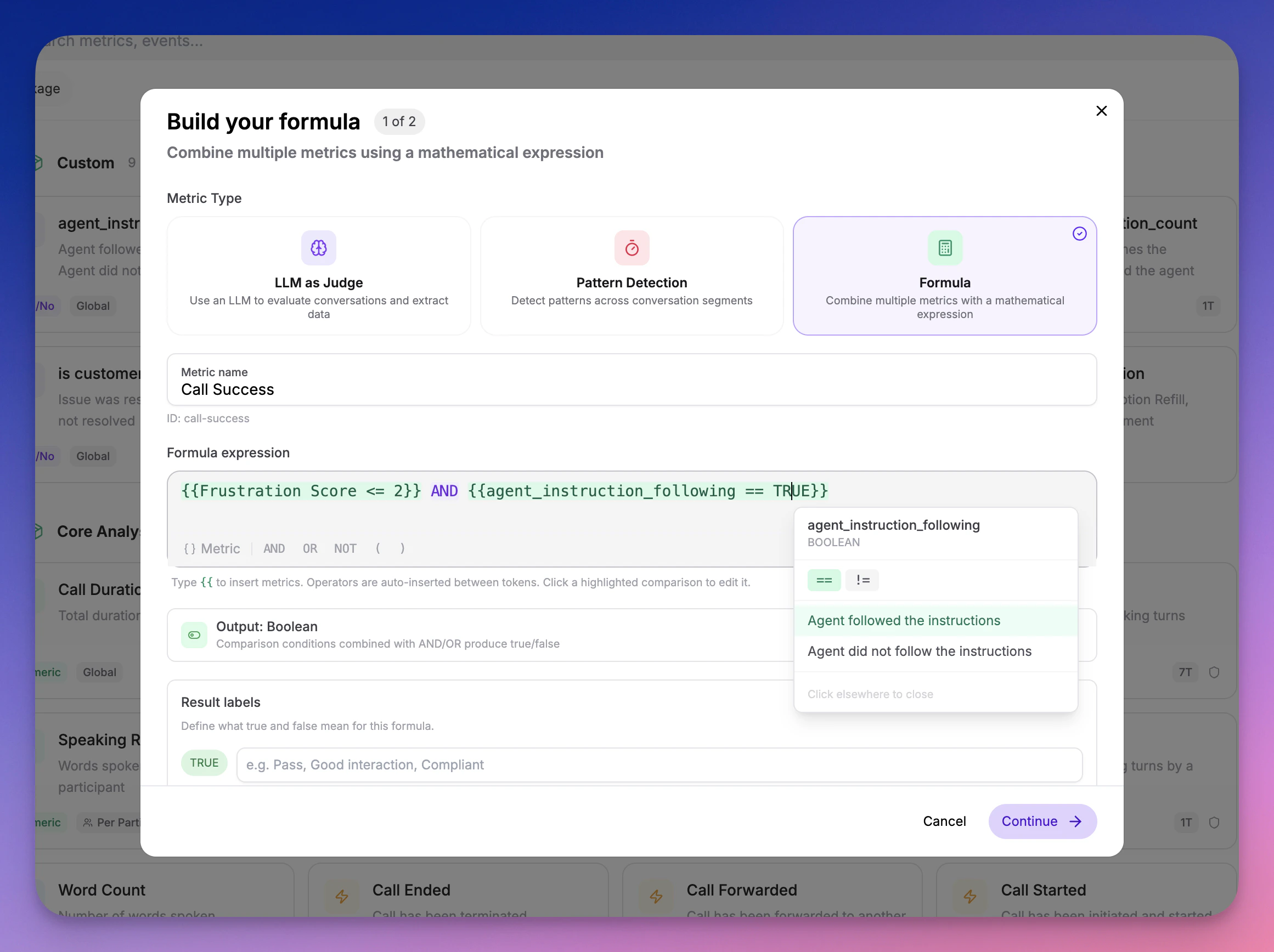 Best for layered quality gates and composite scores built from your existing metrics.
### Configuration Steps
Name your metric, choose an output type, and describe what it measures. For LLM as Judge metrics, write the evaluation prompt. For formulas, build the expression from existing metrics.
Run your metric against a real call in the [Playground](/documentation/metrics/playground) to validate it produces the results you expect. Iterate until you're satisfied.
Attach the metric to a [metric policy](/documentation/metrics/metric-policies) for automated collection on incoming calls, or to a [simulation run plan](/documentation/simulation-testing/run-plans) for testing.
***
## SDK Reference
All API endpoints require authentication. [Generate an API key](/documentation/getting-started/api-keys) to get started.
### Create a Metric Definition
Create a new custom metric definition using the SDK:
**Parameters:**
| Field | Type | Required | Description |
| :------------------ | :-------- | :---------- | :--------------------------------------------------------------------------------- |
| `name` | string | Yes | Name of the metric (1-100 characters) |
| `outputType` | string | Yes | One of: `BOOLEAN`, `NUMERIC`, `TEXT`, `SCALE`, `CLASSIFICATION`, `COUNT`, `OFFSET` |
| `analysisPackageId` | string | Yes | UUID of the analysis package to add this metric to |
| `metricId` | string | No | Unique identifier (auto-generated from name if omitted) |
| `scope` | string | No | `GLOBAL` (default) or `PER_PARTICIPANT` |
| `participantRole` | string | Conditional | Required when scope is `PER_PARTICIPANT` |
| `supportedContexts` | string\[] | No | Defaults to `["CALL"]` |
| `llmPrompt` | string | No | The LLM prompt used to evaluate this metric (max 2000 chars) |
**Type-specific fields:**
| Field | Applies To | Description |
| :--------------------------------------- | :------------- | :-------------------------------------------------------------------------- |
| `booleanTrueLabel` / `booleanFalseLabel` | BOOLEAN | Custom labels for true/false values |
| `scaleMin` / `scaleMax` | SCALE | Range boundaries (0-100) |
| `scaleLabels` | SCALE | Array of label objects with `rangeMin`, `rangeMax`, `label`, `displayOrder` |
| `classificationOptions` | CLASSIFICATION | Array of options with `label`, `description`, `displayOrder` |
| `maxClassifications` | CLASSIFICATION | Maximum number of classifications to select |
**Example: Create a BOOLEAN metric**
```typescript theme={null}
const metric = await client.metric.createDefinition({
name: 'Identity Verified',
outputType: 'BOOLEAN',
analysisPackageId: 'your-package-id',
llmPrompt: 'Did the agent successfully verify the caller identity before proceeding with the request?',
booleanTrueLabel: 'Verified',
booleanFalseLabel: 'Not Verified',
})
```
**Example: Create a SCALE metric**
```typescript theme={null}
const metric = await client.metric.createDefinition({
name: 'Customer Satisfaction',
outputType: 'SCALE',
analysisPackageId: 'your-package-id',
llmPrompt: 'Rate the overall customer satisfaction based on the conversation tone, resolution, and agent helpfulness.',
scaleMin: 1,
scaleMax: 10,
scaleLabels: [
{ rangeMin: 1, rangeMax: 3, label: 'Poor', displayOrder: 1 },
{ rangeMin: 4, rangeMax: 6, label: 'Average', displayOrder: 2 },
{ rangeMin: 7, rangeMax: 10, label: 'Excellent', displayOrder: 3 },
],
})
```
### List Metric Definitions
Retrieve all available metric definitions for your project:
```typescript theme={null}
const definitions = await client.metric.listDefinitions()
// definitions.data[0]
{
id: 'uuid',
metricId: 'response_time',
name: 'Response Time',
description: 'Time taken to respond to a question',
type: 'OFFSET',
scope: 'PER_PARTICIPANT',
supportedContexts: ['SEGMENT_RANGE', 'CALL'],
unit: { name: 'milliseconds', symbol: 'ms' },
}
```
### Get Call Metrics
Retrieve all metrics for a specific call:
```typescript theme={null}
const metrics = await client.call.listMetrics('call-id')
// Or flatten to get a simple list instead of grouped by definition
const flat = await client.call.listMetrics('call-id', { flatten: 'true' })
```
The response groups metrics by definition, with each metric containing an array of values:
```typescript theme={null}
// metrics.data[0]
{
metricDefinitionId: 'uuid',
metricId: 'response_time',
name: 'Response Time',
type: 'OFFSET',
scope: 'PER_PARTICIPANT',
unit: { name: 'milliseconds', symbol: 'ms' },
values: [
{
value: 2500,
context: 'SEGMENT_RANGE',
participantRole: 'agent',
confidence: 1.0,
computedAt: '2024-01-15T10:30:00Z',
fromSegment: { id: 'uuid', text: 'How can I help you today?', startOffsetMs: 1000, endOffsetMs: 2000 },
toSegment: { id: 'uuid', text: 'I have a question about my bill', startOffsetMs: 4500, endOffsetMs: 6000 },
},
],
}
```
### Understanding Metric Values
**Confidence Scores:**
* All metrics include a `confidence` field (0-1)
* Deterministic metrics (like word count, duration) have confidence = 1.0
* AI-powered metrics include the model's confidence level
**Value Reasoning:**
* For AI-computed metrics, the `valueReasoning` field provides explanation
* Useful for understanding why a metric was scored a certain way
* Example: "The agent verified identity using two-factor authentication as mentioned in segment 3"
**Segment Context:**
* When `context` is `SEGMENT`, the `segment` field contains the specific utterance
* When `context` is `SEGMENT_RANGE`, both `fromSegment` and `toSegment` are included
* All segment objects include the full text and timing information
***
## Best Practices
Use the [built-in system metrics](/documentation/metrics/system-metrics) first — they cover performance, sentiment, interruptions, compliance, and more with no setup. Add custom metrics for business-specific needs.
Always validate custom metrics in the [Playground](/documentation/metrics/playground) on representative calls before attaching them to policies.
Instead of creating one complex LLM prompt that tries to measure everything, break it into focused metrics and combine them with a formula.
Track both agent and customer metrics for complete conversation understanding.
***
## What's Next
Browse all 65+ built-in metrics powered by specialized models
Test metrics interactively before deploying
Define pass/fail criteria for your metrics
Automate metric collection with conditions-based rules
Best for layered quality gates and composite scores built from your existing metrics.
### Configuration Steps
Name your metric, choose an output type, and describe what it measures. For LLM as Judge metrics, write the evaluation prompt. For formulas, build the expression from existing metrics.
Run your metric against a real call in the [Playground](/documentation/metrics/playground) to validate it produces the results you expect. Iterate until you're satisfied.
Attach the metric to a [metric policy](/documentation/metrics/metric-policies) for automated collection on incoming calls, or to a [simulation run plan](/documentation/simulation-testing/run-plans) for testing.
***
## SDK Reference
All API endpoints require authentication. [Generate an API key](/documentation/getting-started/api-keys) to get started.
### Create a Metric Definition
Create a new custom metric definition using the SDK:
**Parameters:**
| Field | Type | Required | Description |
| :------------------ | :-------- | :---------- | :--------------------------------------------------------------------------------- |
| `name` | string | Yes | Name of the metric (1-100 characters) |
| `outputType` | string | Yes | One of: `BOOLEAN`, `NUMERIC`, `TEXT`, `SCALE`, `CLASSIFICATION`, `COUNT`, `OFFSET` |
| `analysisPackageId` | string | Yes | UUID of the analysis package to add this metric to |
| `metricId` | string | No | Unique identifier (auto-generated from name if omitted) |
| `scope` | string | No | `GLOBAL` (default) or `PER_PARTICIPANT` |
| `participantRole` | string | Conditional | Required when scope is `PER_PARTICIPANT` |
| `supportedContexts` | string\[] | No | Defaults to `["CALL"]` |
| `llmPrompt` | string | No | The LLM prompt used to evaluate this metric (max 2000 chars) |
**Type-specific fields:**
| Field | Applies To | Description |
| :--------------------------------------- | :------------- | :-------------------------------------------------------------------------- |
| `booleanTrueLabel` / `booleanFalseLabel` | BOOLEAN | Custom labels for true/false values |
| `scaleMin` / `scaleMax` | SCALE | Range boundaries (0-100) |
| `scaleLabels` | SCALE | Array of label objects with `rangeMin`, `rangeMax`, `label`, `displayOrder` |
| `classificationOptions` | CLASSIFICATION | Array of options with `label`, `description`, `displayOrder` |
| `maxClassifications` | CLASSIFICATION | Maximum number of classifications to select |
**Example: Create a BOOLEAN metric**
```typescript theme={null}
const metric = await client.metric.createDefinition({
name: 'Identity Verified',
outputType: 'BOOLEAN',
analysisPackageId: 'your-package-id',
llmPrompt: 'Did the agent successfully verify the caller identity before proceeding with the request?',
booleanTrueLabel: 'Verified',
booleanFalseLabel: 'Not Verified',
})
```
**Example: Create a SCALE metric**
```typescript theme={null}
const metric = await client.metric.createDefinition({
name: 'Customer Satisfaction',
outputType: 'SCALE',
analysisPackageId: 'your-package-id',
llmPrompt: 'Rate the overall customer satisfaction based on the conversation tone, resolution, and agent helpfulness.',
scaleMin: 1,
scaleMax: 10,
scaleLabels: [
{ rangeMin: 1, rangeMax: 3, label: 'Poor', displayOrder: 1 },
{ rangeMin: 4, rangeMax: 6, label: 'Average', displayOrder: 2 },
{ rangeMin: 7, rangeMax: 10, label: 'Excellent', displayOrder: 3 },
],
})
```
### List Metric Definitions
Retrieve all available metric definitions for your project:
```typescript theme={null}
const definitions = await client.metric.listDefinitions()
// definitions.data[0]
{
id: 'uuid',
metricId: 'response_time',
name: 'Response Time',
description: 'Time taken to respond to a question',
type: 'OFFSET',
scope: 'PER_PARTICIPANT',
supportedContexts: ['SEGMENT_RANGE', 'CALL'],
unit: { name: 'milliseconds', symbol: 'ms' },
}
```
### Get Call Metrics
Retrieve all metrics for a specific call:
```typescript theme={null}
const metrics = await client.call.listMetrics('call-id')
// Or flatten to get a simple list instead of grouped by definition
const flat = await client.call.listMetrics('call-id', { flatten: 'true' })
```
The response groups metrics by definition, with each metric containing an array of values:
```typescript theme={null}
// metrics.data[0]
{
metricDefinitionId: 'uuid',
metricId: 'response_time',
name: 'Response Time',
type: 'OFFSET',
scope: 'PER_PARTICIPANT',
unit: { name: 'milliseconds', symbol: 'ms' },
values: [
{
value: 2500,
context: 'SEGMENT_RANGE',
participantRole: 'agent',
confidence: 1.0,
computedAt: '2024-01-15T10:30:00Z',
fromSegment: { id: 'uuid', text: 'How can I help you today?', startOffsetMs: 1000, endOffsetMs: 2000 },
toSegment: { id: 'uuid', text: 'I have a question about my bill', startOffsetMs: 4500, endOffsetMs: 6000 },
},
],
}
```
### Understanding Metric Values
**Confidence Scores:**
* All metrics include a `confidence` field (0-1)
* Deterministic metrics (like word count, duration) have confidence = 1.0
* AI-powered metrics include the model's confidence level
**Value Reasoning:**
* For AI-computed metrics, the `valueReasoning` field provides explanation
* Useful for understanding why a metric was scored a certain way
* Example: "The agent verified identity using two-factor authentication as mentioned in segment 3"
**Segment Context:**
* When `context` is `SEGMENT`, the `segment` field contains the specific utterance
* When `context` is `SEGMENT_RANGE`, both `fromSegment` and `toSegment` are included
* All segment objects include the full text and timing information
***
## Best Practices
Use the [built-in system metrics](/documentation/metrics/system-metrics) first — they cover performance, sentiment, interruptions, compliance, and more with no setup. Add custom metrics for business-specific needs.
Always validate custom metrics in the [Playground](/documentation/metrics/playground) on representative calls before attaching them to policies.
Instead of creating one complex LLM prompt that tries to measure everything, break it into focused metrics and combine them with a formula.
Track both agent and customer metrics for complete conversation understanding.
***
## What's Next
Browse all 65+ built-in metrics powered by specialized models
Test metrics interactively before deploying
Define pass/fail criteria for your metrics
Automate metric collection with conditions-based rules