> ## Documentation Index
> Fetch the complete documentation index at: https://docs.roark.ai/llms.txt
> Use this file to discover all available pages before exploring further.
# API Keys
> Generate and manage authentication keys for Roark APIs
## Overview
API keys authenticate your requests to Roark's API, enabling secure access to monitoring, testing, and analytics features.
API keys are essential for all integrations - whether you're using our SDKs, webhooks, or direct API calls.
## Generating an API Key
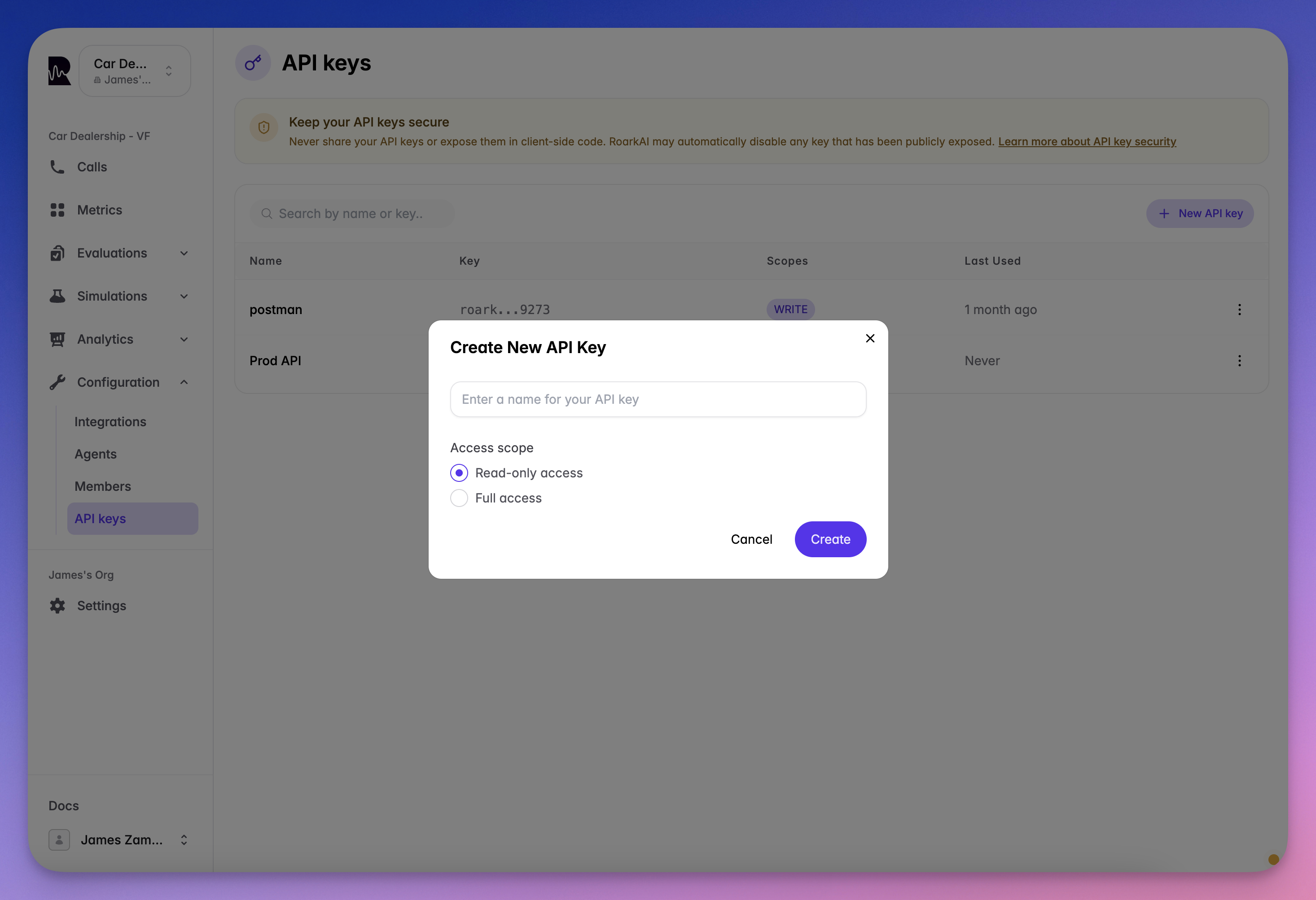
Go to the API Keys section in your dashboard
Click the "Create API Key" button
Choose your access level:
* **Read-Only**: Retrieve data only
* **Full Access**: Read and write operations
Copy and store your key immediately - it won't be shown again
 ## Using Your API Key
All API requests require authentication via the Authorization header:
```bash cURL theme={"theme":{"light":"everforest-light","dark":"everforest-dark"}}
curl -X GET "https://api.roark.ai/health" \
-H "Authorization: Bearer YOUR_API_KEY"
```
```python Python theme={"theme":{"light":"everforest-light","dark":"everforest-dark"}}
import requests
headers = {
"Authorization": "Bearer YOUR_API_KEY"
}
response = requests.get("https://api.roark.ai/health", headers=headers)
```
```typescript TypeScript theme={"theme":{"light":"everforest-light","dark":"everforest-dark"}}
const response = await fetch("https://api.roark.ai/health", {
headers: {
"Authorization": `Bearer YOUR_API_KEY`
}
});
```
```javascript Node.js theme={"theme":{"light":"everforest-light","dark":"everforest-dark"}}
const axios = require('axios');
const config = {
headers: {
'Authorization': 'Bearer YOUR_API_KEY'
}
};
const response = await axios.get('https://api.roark.ai/health', config);
```
## Security Best Practices
Never expose your API key in client-side code, public repositories, or logs. If compromised, regenerate immediately in your dashboard.
Store keys in `.env` files or secure vaults, never hardcode them
Regenerate keys periodically to maintain security
Use read-only keys when write access isn't needed
Check last-used timestamps to detect unauthorized access
## Common Integration Patterns
Initialize SDKs with your key:
```javascript theme={"theme":{"light":"everforest-light","dark":"everforest-dark"}}
const roark = new RoarkClient({
apiKey: process.env.ROARK_API_KEY
});
```
Store as secret in your pipeline:
```yaml theme={"theme":{"light":"everforest-light","dark":"everforest-dark"}}
env:
ROARK_API_KEY: ${{ secrets.ROARK_API_KEY }}
```
## Need Help?
Explore all available endpoints and parameters
Step-by-step platform integration tutorials
## Using Your API Key
All API requests require authentication via the Authorization header:
```bash cURL theme={"theme":{"light":"everforest-light","dark":"everforest-dark"}}
curl -X GET "https://api.roark.ai/health" \
-H "Authorization: Bearer YOUR_API_KEY"
```
```python Python theme={"theme":{"light":"everforest-light","dark":"everforest-dark"}}
import requests
headers = {
"Authorization": "Bearer YOUR_API_KEY"
}
response = requests.get("https://api.roark.ai/health", headers=headers)
```
```typescript TypeScript theme={"theme":{"light":"everforest-light","dark":"everforest-dark"}}
const response = await fetch("https://api.roark.ai/health", {
headers: {
"Authorization": `Bearer YOUR_API_KEY`
}
});
```
```javascript Node.js theme={"theme":{"light":"everforest-light","dark":"everforest-dark"}}
const axios = require('axios');
const config = {
headers: {
'Authorization': 'Bearer YOUR_API_KEY'
}
};
const response = await axios.get('https://api.roark.ai/health', config);
```
## Security Best Practices
Never expose your API key in client-side code, public repositories, or logs. If compromised, regenerate immediately in your dashboard.
Store keys in `.env` files or secure vaults, never hardcode them
Regenerate keys periodically to maintain security
Use read-only keys when write access isn't needed
Check last-used timestamps to detect unauthorized access
## Common Integration Patterns
Initialize SDKs with your key:
```javascript theme={"theme":{"light":"everforest-light","dark":"everforest-dark"}}
const roark = new RoarkClient({
apiKey: process.env.ROARK_API_KEY
});
```
Store as secret in your pipeline:
```yaml theme={"theme":{"light":"everforest-light","dark":"everforest-dark"}}
env:
ROARK_API_KEY: ${{ secrets.ROARK_API_KEY }}
```
## Need Help?
Explore all available endpoints and parameters
Step-by-step platform integration tutorials